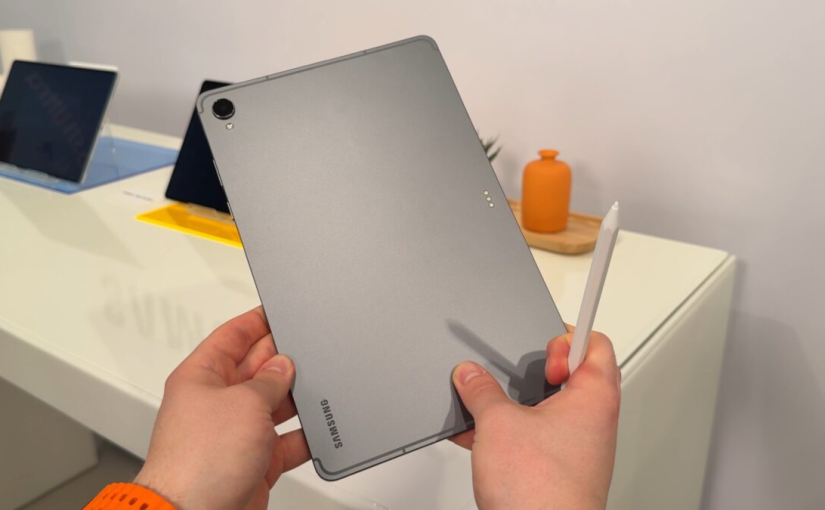
A New Chapter for Tablets in New Zealand
Tablets are becoming more than convenient screens for watching videos or browsing the internet. For students, professionals, small-business owners and creative users across New Zealand, they are increasingly practical tools for learning, communication and everyday productivity. Samsung’s new Galaxy Tab S12 series arrives at an important moment, offering a combination of large displays, artificial intelligence, powerful hardware and long-lasting battery performance.
Announced in Auckland on 1 October 2026, the Galaxy Tab S12 series comprises the Galaxy Tab S12 Ultra and Galaxy Tab S12+. Samsung has highlighted their slim designs, updated Galaxy AI capabilities and improved performance, positioning both models as versatile devices for demanding daily tasks. New Zealand availability is scheduled to begin on 21 October, giving local consumers a fresh option as they consider their next technology upgrade.
The timing is particularly relevant in a country where people often move between home offices, university campuses, public libraries, cafés and workplaces. A tablet that can handle research, note-taking, video calls and entertainment without constantly requiring a charger could offer meaningful everyday value.
However, the real question is whether the latest hardware and AI features translate into a better experience for New Zealand users. Understanding the changes requires looking beyond specifications to examine how people actually use their devices.
Galaxy AI Brings a More Flexible Way to Work
Artificial intelligence is becoming a central part of the modern computing experience, and Samsung is placing it at the heart of the Galaxy Tab S12 series. Running Android 17 with One UI 9, the new tablets combine Samsung’s software environment with a range of AI-assisted tools designed to make information easier to organise, understand and use.
For a university student preparing an assignment, this could mean summarising notes, reviewing research materials and creating practice questions. Someone managing a small business might use AI assistance to organise ideas, prepare documents or identify key points from a collection of information.
The larger display also gives these tools more room to work. Rather than repeatedly switching between applications on a phone, users can arrange several windows on the same screen. Samsung’s Multi Window functionality supports layouts with up to three sections, allowing a lecture, a note-taking application and an AI assistant to remain visible together.
This arrangement could be particularly useful for distance learning and remote work. A student can watch a recorded lecture while writing notes, whereas a professional can consult reference documents while drafting a proposal.
Nevertheless, AI should be treated as an assistant rather than an unquestionable source of truth. Automatically generated summaries can overlook important details, and factual claims still need verification. Users should also consider the privacy implications of uploading confidential business information or personal documents to online services.
A Large Display Designed for More Than Entertainment
Display quality can determine whether a tablet feels like a practical workstation or simply a larger smartphone. Samsung is addressing this distinction with two different screen sizes in the Galaxy Tab S12 family.
The Galaxy Tab S12 Ultra features a 14.6-inch Dynamic AMOLED 2X display, while the Galaxy Tab S12+ offers a 12.6-inch version. Both support adaptive refresh rates of up to 120Hz and peak brightness of up to 1,600 nits, according to Samsung.
These specifications have practical implications. A large, responsive display can make scrolling through lengthy documents, annotating diagrams and editing photographs feel more comfortable. High brightness can also improve visibility in bright environments, although actual results depend on lighting conditions and display settings.
For creative users, screen size matters when working with illustrations, layouts or video timelines. A wider workspace allows more of a project to remain visible without repeatedly zooming in and out.
The Ultra model may appeal to people who prioritise screen space and advanced productivity, while the S12+ offers a more compact alternative. Neither size is automatically better for everyone. Someone who frequently works at a desk may appreciate the larger panel, while a commuter may prefer a tablet that fits more easily into a backpack.
New Zealand consumers should also consider how they will carry and protect the device. A large screen can improve productivity, but the additional physical footprint may become inconvenient during crowded commutes or when travelling between meetings.
Battery Performance Matters for Everyday Mobility
A tablet can have an impressive screen and sophisticated software, but those advantages become less useful when the device needs frequent charging. Battery endurance is therefore an important consideration for people who depend on portable technology throughout the day.
Samsung advertises up to 23 hours of battery life for the Galaxy Tab S12 Ultra and up to 21 hours for the Galaxy Tab S12+. These figures are based on specified testing conditions and should not be interpreted as guaranteed results for every user. Display brightness, mobile connectivity, background applications, gaming and video editing can all affect real-world endurance.
For someone spending a full day at university, working remotely or travelling between appointments, longer battery life can reduce the need to carry a charger everywhere. It can also provide greater flexibility when power outlets are difficult to access.
Battery health deserves attention beyond the first few weeks of ownership. As rechargeable batteries age, their ability to retain charge gradually declines. Users who rely heavily on their tablets should monitor changes in runtime and charging behaviour rather than assuming that every reduction in endurance indicates a serious fault.
Anyone researching a replacement Samsung tablet battery should first identify the exact tablet model and its compatible battery specifications. Battery compatibility is not universal across the Galaxy Tab range, even when devices share similar names or screen sizes. Professional assessment can also help determine whether declining endurance results from battery ageing, software activity or another hardware issue.
For new buyers, sensible charging habits, software updates and avoiding prolonged exposure to excessive heat can help support long-term device care.
Performance Upgrades Support Demanding Applications
The Galaxy Tab S12 series is designed to handle more than basic browsing and streaming. Samsung says its new 3-nanometre processor delivers up to 61% faster neural processing, 19% faster CPU performance and 17% improved GPU performance compared with the Galaxy Tab S11 Ultra.
These are manufacturer-provided comparisons, and the actual differences experienced by users will vary depending on applications and workloads.
Even so, stronger processing capabilities can be valuable when a tablet needs to manage several demanding tasks simultaneously. Video editing, image processing, digital illustration and AI-assisted workflows can place greater demands on hardware than ordinary web browsing.
Samsung has also introduced a redesigned three-dimensional vapour chamber to improve heat dissipation. Thermal management is important because sustained workloads can cause processors to generate substantial heat, potentially affecting performance during extended sessions.
For New Zealand’s growing community of freelancers, digital creators and small-business operators, a tablet capable of handling heavier workloads could provide a useful alternative to carrying a laptop everywhere.
However, professional users should evaluate their specific software requirements before making a purchase. A tablet may be excellent for drawing, reviewing documents and editing short videos, yet still be less suitable than a traditional computer for specialist applications, extensive spreadsheet work or complex desktop workflows.
The most useful upgrade is not necessarily the device with the highest benchmark score. It is the device that performs the tasks a person needs reliably and comfortably.
S Pen and Productivity Apps Expand the Possibilities
The Galaxy Tab S12 series includes an S Pen, giving users a natural way to write, annotate documents, sketch concepts and interact with applications.
This feature is particularly relevant to education. Students can mark up lecture slides, organise handwritten notes and draw diagrams without printing large amounts of paper. People attending online meetings can also use a stylus to highlight information or record ideas quickly.
Samsung is supporting the new tablets with a broader selection of productivity and creative applications. Its announced software offering includes Adobe Photoshop, Notability, Goodnotes, LumaFusion and Notion, alongside other tools for writing, design and organisation. Availability, promotional periods and subscription conditions can vary by market.
For a freelance designer, Photoshop and stylus input may offer a convenient way to edit images while away from a workstation. A video creator might appreciate LumaFusion, while a student may place greater value on digital notebooks and revision tools.
The practical advantage comes from combining hardware and software into a coherent workflow. A large screen, stylus input, multitasking and AI assistance can reduce the friction involved in moving from an initial idea to a finished piece of work.
Before purchasing, however, buyers should check whether the applications they need support all the functions they expect on Android. Desktop and mobile versions of the same software do not always offer identical features.
What the New Tablets Mean for New Zealand Students and Workers
The New Zealand market has a wide range of tablet users, from secondary and tertiary students to remote employees, business owners and families seeking an entertainment device.
For students, the S12+ could provide a balance between screen space and portability. It offers enough room for reading, writing and viewing online learning materials without the larger footprint of the Ultra model.
Professionals who regularly work with complex documents, creative applications or multiple open windows may find the Ultra more attractive. Its larger display could be especially useful when a tablet doubles as a secondary work screen or a lightweight workstation with a compatible keyboard.
Families should approach the decision differently. A premium tablet may offer excellent performance, but a less expensive device could be more appropriate for casual streaming, browsing and children’s educational applications.
The cost of accessories also deserves attention. A keyboard, protective case, stylus accessories and software subscriptions can increase the total expense beyond the initial purchase price.
Battery condition is another long-term ownership consideration. Buyers comparing older tablets with a new Galaxy model should consider not only purchase prices but also remaining battery capacity, software support, storage and expected lifespan. A well-maintained older device may still be adequate for everyday tasks, while an ageing tablet with poor endurance could be less economical over time.
Durability, Software Support and Long-Term Value
Portable devices experience a variety of conditions in everyday life, from being carried in backpacks to being used in cafés, classrooms and shared workspaces.
Samsung states that both Galaxy Tab S12 models have an IP68 rating for water and dust resistance. This provides a level of protection under specified laboratory conditions, but it does not make the tablets indestructible or guarantee protection against every accident. Water resistance can also diminish with normal wear.
Samsung has announced support for up to seven operating-system upgrades and seven years of security updates for the series. Long-term software support can be a significant advantage for buyers who prefer to keep devices for several years rather than replace them frequently.
Still, durability depends on more than software. Screen protection, careful storage, appropriate charging accessories and timely repairs all contribute to the usable life of a tablet.
If a device eventually develops reduced battery endurance, users should seek a reliable diagnosis before deciding whether replacement or repair is worthwhile. Anyone looking for a compatible Samsung tablet battery should verify the precise model number, connector arrangement and electrical specifications before proceeding. An incorrect component can create compatibility and safety problems.
Good ownership decisions also include backing up important files and installing security updates promptly. These simple steps help protect the value of a device long after the excitement of a new purchase has passed.
Is the Galaxy Tab S12 Series Worth Considering?
The Galaxy Tab S12 series brings together several features that matter to modern tablet users: large AMOLED displays, improved processing performance, AI-assisted software, S Pen support and extended advertised battery life.
Its strongest appeal lies in the way these elements work together. Instead of treating a tablet as a device for consuming content, Samsung is positioning it as a tool for producing content, learning new skills and completing everyday work.
The Ultra is likely to suit users who value a generous display and demanding creative workflows. The S12+ may be more appropriate for those who want strong productivity features in a somewhat smaller package.
Neither model will be the right choice for every household. Budget, software compatibility, accessory costs and portability should all influence the final decision. Prospective buyers in New Zealand should also compare local retail pricing, warranty conditions and availability before committing.
The broader lesson is that battery life, performance and AI features are most valuable when they solve real problems. A tablet that comfortably lasts through a working day, supports the applications a person needs and fits naturally into existing routines can be more useful than one that simply offers impressive specifications.
For New Zealand consumers considering a tablet upgrade in late 2026, the Galaxy Tab S12 series deserves attention as a new premium option. Its long-term value will ultimately depend on everyday reliability, software usefulness and how effectively it helps people turn screen time into meaningful results.