The Laptop Workspace Is Getting a Major Makeover
For years, laptops have been celebrated for their portability. They allow people to work from almost anywhere, whether that means a busy office in Auckland, a quiet café in Wellington, a university library in Christchurch, or a holiday home overlooking the coast. Yet as digital work becomes more complicated, one familiar problem continues to frustrate users: there simply isn’t enough screen space.
Imagine editing a video, checking emails, attending an online meeting, and researching information at the same time. On a traditional laptop, these tasks often involve constantly switching between windows, shrinking documents, and searching for the right browser tab. Even a powerful computer can feel frustrating when its display becomes crowded.
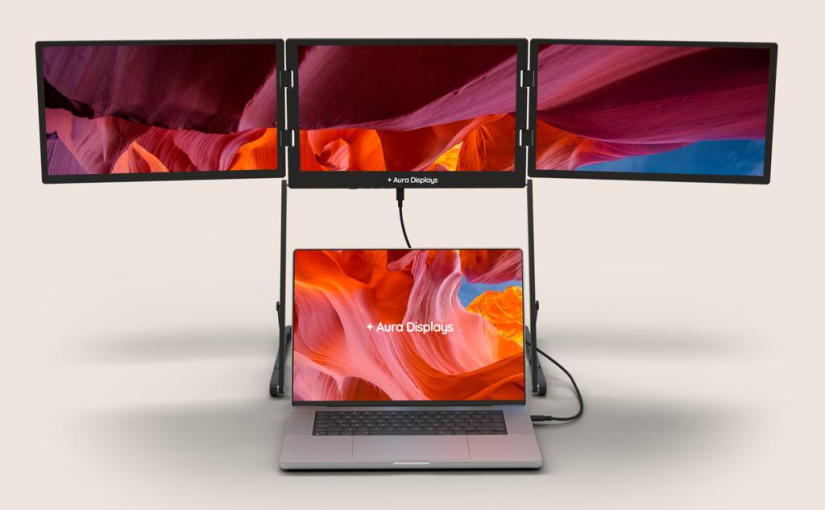
This is where multi-screen laptop accessories are attracting attention. Instead of replacing an existing computer, these portable display systems can add two or even three extra screens to a laptop. The idea sounds unusual at first, but it could represent an exciting change in how people organise their digital workspaces.
For New Zealanders who rely on flexible working arrangements, independent businesses, online education, and digital creativity, the possibility of carrying an entire multi-screen workstation in one bag is particularly appealing.
Why One Laptop Screen No Longer Feels Like Enough
Modern digital tasks rarely happen in isolation. A marketing professional might need to monitor social media statistics while writing advertising content and responding to customer messages. A university student could be reading an online textbook, preparing an assignment, and participating in a virtual lecture.
Trying to manage everything on a single display can quickly become exhausting.
Switching between applications repeatedly interrupts concentration. Important information disappears behind other windows, and users may spend more time organising their screens than actually completing their work.
Additional displays offer a straightforward solution. One screen can show the main project, another can display research materials, and a third can keep communication tools visible. Rather than repeatedly opening and closing applications, users can see more information simultaneously.
This approach is especially useful for people who regularly work with spreadsheets, presentations, design software, programming tools, or multiple browser windows.
The benefit is not simply having more pixels. It is having a workspace that better matches the way people think and work.
Could Three Extra Screens Change Remote Work in New Zealand?
Flexible working has become an important part of New Zealand’s professional landscape. Auckland’s technology businesses, Wellington’s government and creative industries, and smaller companies operating across regional communities all depend on digital communication.
Remote workers often face an interesting challenge. Their laptops need to be portable enough for travelling between locations but powerful and comfortable enough for demanding daily tasks.
A multi-screen attachment could help bridge that gap.
Consider someone working from home in Hamilton. They might use the main laptop display for writing a report, an additional screen for a video conference, and another for financial information or project management software. With everything visible, the workflow becomes easier to follow.
For freelancers, this arrangement could be equally useful. Graphic designers can compare reference images with their current projects, while digital marketers can monitor campaign performance without constantly switching between dashboards.
Even people who work from different locations throughout the week could benefit. Instead of maintaining a complicated desktop setup in every location, they could carry a compact display system alongside their laptop.
However, portability remains essential. A workstation that takes too long to assemble or requires several bulky accessories may lose much of its appeal.
The Technology Behind Portable Multi-Screen Displays
Portable multi-screen accessories generally use lightweight panels that attach to the sides or rear of a laptop display. Depending on the design, they may fold out like wings, slide into position, or connect through a stand.
Many models rely on USB-C connections, while others require HDMI cables or additional power connections. Some can operate through a single compatible connection, making setup relatively simple.
Screen quality also matters. Resolution, brightness, viewing angles, refresh rates, and colour accuracy all influence the experience.
For everyday office work, clear text and comfortable brightness may be more important than extremely high refresh rates. For video editors, photographers, and designers, colour reproduction and resolution become much more significant.
Weight is another consideration. A three-screen accessory may look impressive on a product page, but its practical value depends on whether users can comfortably transport it.
Laptop compatibility should never be overlooked either. Not every USB-C port supports video output, and some laptops have limitations on the number of external displays they can operate simultaneously.
Before purchasing an accessory, users should check the computer’s graphics capabilities, supported display connections, operating system compatibility, and power requirements.
Is More Screen Space Actually Better for Productivity?
It is tempting to assume that adding more displays automatically makes people more productive. However, the relationship between screen space and performance is more complicated.
Additional screens are most useful when they serve clear purposes. For example, keeping reference materials on one display while editing a document on another can reduce unnecessary interruptions.
On the other hand, opening several social media feeds, messaging applications, and entertainment websites across multiple screens could create more distractions.
The real advantage comes from thoughtful organisation.
A sensible three-screen arrangement might include a primary display for the main task, a secondary display for supporting information, and a third for communication or monitoring.
This setup can be particularly effective for people who work with large datasets, manage online stores, coordinate projects, or create digital content.
New Zealand’s small business community may find this especially interesting. Many entrepreneurs handle customer service, inventory, marketing, and administration themselves. Having several applications visible could make these responsibilities easier to manage.
Still, productivity depends on habits, software, and concentration as much as hardware. More screens are tools, not automatic solutions.
The Battery Challenge Behind a Bigger Workspace
There is one important question that multi-screen enthusiasts should not ignore: power consumption.
A traditional laptop already needs to supply energy to its processor, memory, storage, keyboard lighting, wireless connections, and display. Connecting several additional monitors can introduce another demand on the system, particularly when those screens draw power directly from the computer.
This means that users who regularly work away from power outlets should pay attention to energy efficiency.
The actual impact depends on the type of display, brightness settings, connection method, and laptop hardware. Some portable monitors have their own power supplies, while others receive power through USB connections.
For people who spend long hours working in cafés, libraries, or during intercity travel, battery performance can influence whether a multi-screen setup is genuinely convenient.
A reliable laptop battery is therefore an important part of the overall experience. Users should consider their computer’s battery capacity, charging speed, and expected operating time before adding several accessories.
Reducing screen brightness when possible, disconnecting unused peripherals, and choosing energy-efficient monitors can also help manage power consumption.
Could Multi-Screen Setups Help Students and Creators?
The potential audience extends well beyond office workers.
New Zealand students increasingly use digital resources for research, assignments, online collaboration, and presentations. A second or third screen could make it easier to compare sources, follow lecture materials, and write assignments without repeatedly changing windows.
For creative professionals, the possibilities are even more interesting.
Video editors could keep their editing timeline on the main display while viewing source footage and project information elsewhere. Music producers might use one screen for recording software and another for mixing controls. Developers could write code on one display while checking documentation and testing applications on separate screens.
Content creators could also benefit from having editing tools, video previews, and publishing dashboards visible at once.
These arrangements are particularly attractive to independent creators who do not necessarily have space for a permanent desktop workstation.
However, students should think carefully about cost and practicality. A high-quality laptop with a well-organised workspace may be more valuable than an expensive accessory that is rarely used.
What Should New Zealand Buyers Look For?
Anyone considering a portable multi-screen setup should start by identifying the tasks they actually perform.
The first consideration is compatibility. Buyers should confirm that their laptop supports the required number of external displays and has suitable video connections.
Next comes screen quality. A display with poor brightness or uncomfortable viewing angles may become frustrating during extended work sessions.
Weight and dimensions are equally important. New Zealanders who travel frequently between home, university, and workplaces may prefer a lighter dual-screen attachment over a heavier three-screen system.
Build quality deserves attention as well. Hinges, mounting brackets, cables, and protective covers all affect long-term usability.
Price is another factor. Imported technology products can involve shipping costs, exchange-rate fluctuations, and potentially different warranty arrangements. Buyers should compare the complete cost rather than focusing only on the advertised price.
It is also worth checking whether the accessory needs external power. A product that requires several separate cables may be less convenient than expected.
Finally, users should consider the computer’s overall energy demands. Adding multiple displays can change daily charging habits, especially for people who frequently work away from their desks. A dependable laptop battery and a suitable charging solution can make a noticeable difference to the practicality of a portable workstation.
Will Three Screens Become the New Normal?
Multi-screen laptop accessories are unlikely to replace traditional single-screen computers for everyone. Many people value simplicity, and a lightweight laptop remains perfectly adequate for browsing, writing, communication, and everyday administration.
Nevertheless, the growing range of portable display products reflects an important shift in consumer expectations.
People increasingly want devices that can adapt to different environments. A laptop might serve as a compact travel computer in the morning and become a full workstation in the afternoon. Portable monitors make that transformation possible without requiring users to purchase an entirely new computer.
For New Zealand’s growing digital economy, this flexibility could be particularly useful. Freelancers, remote employees, students, entrepreneurs, and creative professionals all have different reasons to seek more screen space.
The next generation of accessories may also become thinner, lighter, easier to connect, and more energy efficient. Better folding mechanisms and improved display technology could make multi-screen systems less cumbersome than today’s products.
The most successful designs will probably be those that balance functionality with portability rather than simply adding as many displays as possible.
The Future of Portable Workspaces Is About Flexibility
Three extra screens may sound excessive to someone who has always worked on a traditional laptop. Yet for people managing several digital tasks simultaneously, the concept offers a surprisingly practical solution.
New Zealanders do not necessarily need larger offices or expensive desktop computers to create more comfortable digital workspaces. Sometimes, a clever accessory can make an existing device considerably more versatile.
Of course, the best setup is not always the one with the most screens. It is the one that helps people concentrate, work comfortably, and move between locations without unnecessary complications.
As portable display technology continues to develop, multi-screen accessories could become an increasingly familiar sight in cafés, coworking spaces, university libraries, and home offices.
And while extra screens may attract the initial attention, the real measure of success will be much simpler: whether people can get more meaningful work done without making their digital lives more complicated.