A New Way to Interact With Computers
Imagine sitting at your desk, browsing the internet, writing an email, or playing a computer game without moving your hands. Instead of reaching for a mouse or tapping a keyboard, you simply move your tongue slightly to guide the cursor across the screen. It might sound like something from a science-fiction film, but tongue-controlled technology is becoming a fascinating area of human-computer interaction.
For people in New Zealand, where digital services, remote working, online education, and accessible technology are increasingly important, this idea raises an interesting question: could the next generation of computer controls be operated without using our hands?
Traditional computers rely heavily on keyboards, touchscreens, and mice. These tools are familiar and effective, but they are not suitable for everyone. People with limited hand movement, certain physical disabilities, or temporary injuries may find ordinary computer controls difficult to use. A tongue-controlled interface could offer another way to communicate with digital devices.
The technology also has an unexpected appeal beyond accessibility. It challenges the assumption that interacting with a computer must involve our fingers.
How Does Tongue-Controlled Technology Work?
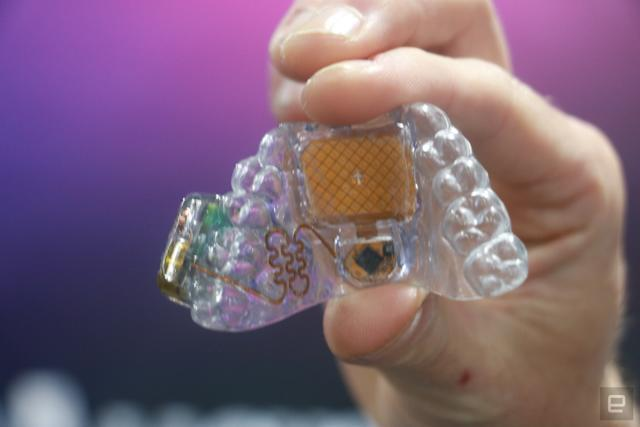
One interesting example is MouthPad, a wearable device designed to sit against the roof of the mouth. It uses sensors to detect movements made by the tongue and translates those movements into digital commands.
The basic concept is surprisingly straightforward. When the user moves their tongue towards different areas of the device, sensors recognise the movement. The information is then transmitted wirelessly to a connected computer or compatible digital device.
Instead of physically moving a mouse, the user can control the cursor through small and deliberate tongue movements. Depending on the system and its software, additional actions such as clicking or selecting items may also be possible.
This approach is different from voice control. Voice assistants require users to speak commands, which may not always be practical in a busy office, public library, classroom, or shared household. A tongue-controlled device offers a quieter alternative.
It also differs from eye-tracking technology, which uses eye movements to navigate a screen. Each approach has its own strengths, and future computer systems may combine several input methods to create more flexible experiences.
Why New Zealand Could Be Interested in Hands-Free Computing
New Zealand has a strong digital services culture. People regularly use online banking, government services, video meetings, educational platforms, and cloud-based work tools. As more everyday activities move online, accessible ways to operate computers become increasingly valuable.
Consider someone working remotely from a home office in Wellington or Auckland. They might spend several hours each day reading documents, joining meetings, answering messages, and switching between applications.
For most people, using a mouse and keyboard feels natural. However, someone recovering from a wrist injury or living with restricted hand movement may need a different approach.
A hands-free interface could make some of these tasks easier, depending on the user’s needs and the device’s capabilities.
New Zealand’s relatively small population does not mean that accessibility innovation is unimportant. In fact, technologies that help people participate more fully in education, employment, and social life can have meaningful benefits across communities.
The idea is particularly relevant for people who live in smaller towns or rural areas, where accessing specialist equipment and in-person technical support may be more challenging.
Could It Change the Future of Remote Work?
Remote work has become an established part of professional life in New Zealand. From freelancers and designers to customer service teams and software developers, many people rely on computers throughout the working day.
A tongue-controlled interface could provide an alternative input method for certain office tasks.
For example, a person could use a computer to navigate a document, select an online meeting, or move between applications without relying entirely on their hands. When combined with speech recognition and accessibility software, the possibilities become even more interesting.
Imagine a home office where a worker can use voice commands to dictate a report, tongue movements to navigate the interface, and a traditional keyboard only when necessary.
This kind of multi-input environment could make computing more adaptable.
However, it would be unrealistic to expect tongue-controlled technology to replace the mouse completely. Tasks such as detailed graphic design, complex spreadsheet editing, and precision gaming may still benefit from conventional controls.
The more practical future is likely to involve different input methods working together, allowing users to choose the most comfortable option for each task.
What About Gaming and Digital Entertainment?
Gaming is another area where alternative controls could attract attention.
New Zealand has an active gaming community, with players enjoying everything from casual mobile games to competitive PC gaming. Most gaming setups still depend on controllers, keyboards, and mice.
A tongue-controlled interface could introduce a different experience, particularly for games that involve navigation, selection, or slower-paced interaction.
For example, imagine controlling a strategy game by moving your tongue to select buildings, navigate menus, or issue simple commands. It could create a completely different relationship between the player and the game.
Accessibility in gaming is also becoming an important consideration. Not every player can comfortably use a standard controller, and alternative input devices can help more people enjoy digital entertainment.
Developers could eventually explore custom control schemes that support several input methods simultaneously.
Of course, speed and accuracy would need careful testing. Fast-paced racing games or competitive shooters may place demands on an input device that are difficult to meet. Nevertheless, the technology could open interesting opportunities in casual gaming and accessible entertainment.
Why Ordinary Computer Accessories Still Matter
Even if unusual input devices become more common, traditional computer accessories will not disappear overnight.
Wireless mice, keyboards, headsets, and charging equipment remain essential parts of everyday computing. Most people will continue to use familiar devices because they are affordable, widely compatible, and easy to understand.
Battery performance is particularly important for wireless accessories. Nobody wants a mouse to stop working in the middle of an important video meeting or while finishing a project.
For users who depend on wireless peripherals, choosing a suitable mouse battery and maintaining reliable charging habits can help keep their everyday equipment ready for use.
The same principle applies to emerging accessibility devices. Wearable electronics need dependable power management, comfortable designs, and convenient charging arrangements if they are going to become practical everyday tools.
Technology is only useful when people can rely on it.
The Challenges Behind This Unusual Technology
Despite its exciting potential, tongue-controlled computing still faces several challenges.
Comfort is one of the biggest questions. A device placed inside the mouth must be designed carefully. It needs to fit securely, avoid causing irritation, and remain comfortable during extended use.
Hygiene is another important consideration. Because the device comes into contact with saliva, materials and cleaning procedures must be appropriate for repeated use.
Accuracy is equally important. Small tongue movements need to be recognised consistently, even when users move their heads or change their posture.
Learning to operate the system may also take time. People who have spent decades using a mouse might initially find a new control method unfamiliar.
Price and availability could present additional barriers. Specialised accessibility equipment may cost more than ordinary computer accessories, and customers outside major cities may have fewer opportunities to try devices before purchasing them.
For New Zealand consumers, local support, warranty arrangements, compatibility information, and replacement options will all influence whether a product becomes practical.
Could Artificial Intelligence Make It Even Smarter?
Artificial intelligence could make alternative input devices more useful in the future.
For instance, AI-powered software might learn a user’s preferred movement patterns and improve cursor control over time. It could also help distinguish intentional commands from accidental movements.
Imagine a system that recognises when a user is trying to select a button rather than simply reposition the cursor. It might reduce the number of movements required to complete everyday tasks.
AI could also help combine tongue movements, eye tracking, and voice commands into a single interface.
A user might move their tongue to navigate a page, look at a particular icon to highlight it, and use a voice command to confirm the selection.
Such a system could make digital interaction feel more natural and personalised.
However, developers would need to pay close attention to privacy. Devices that collect movement data or process voice information should provide clear explanations of what information is collected and how it is used.
Users should remain in control of their personal data.
What Should Consumers Look For Before Buying?
For anyone considering an alternative computer input device, the first step should be understanding their own requirements.
Compatibility is essential. A device may support certain computers, operating systems, or applications but not others. Checking these details before purchasing can prevent unnecessary frustration.
Comfort should also be a priority. Wearable equipment needs to suit the individual user, especially when it is intended for extended daily use.
Another consideration is power management. Wireless technology makes devices more convenient, but battery life, charging time, and charging frequency all affect the overall experience.
For conventional wireless peripherals, a dependable mouse battery remains an important part of maintaining a reliable workspace. For newer wearable devices, consumers should pay attention to the manufacturer’s stated battery specifications and recommended charging methods.
It is also worth checking whether the product offers software updates, technical support, and replacement accessories.
For people purchasing accessibility equipment, professional advice or a hands-on demonstration may help determine whether a particular control method is suitable.
Could This Become the Next Big Thing in Personal Computing?
It is difficult to predict whether tongue-controlled computing will become a mainstream technology. Not every unusual invention becomes a household product, and traditional mice and keyboards are unlikely to disappear soon.
However, the bigger idea is worth paying attention to.
For decades, computer design has focused on improving the familiar keyboard, mouse, and touchscreen. Now, developers are exploring ways to make technology respond to more parts of the human body.
This shift could influence future laptops, smart devices, workplace equipment, and accessible digital services.
New Zealand consumers may not rush to replace their existing computer accessories, but they could benefit from having more choices as these technologies develop.
The future of computing might not be about finding one perfect way to control a device. Instead, it could involve giving people several options and allowing them to switch between them whenever necessary.
A Small Movement With Big Possibilities
Controlling a computer with your tongue may seem unusual today, but it highlights an important direction in technology: making digital experiences more flexible and inclusive.
Whether the goal is improving accessibility, supporting remote work, or exploring new forms of gaming, alternative input devices challenge the limits of traditional computer interaction.
For now, most New Zealand households will continue using familiar keyboards, mice, and touchscreens. Reliable accessories and a suitable mouse battery will remain part of everyday digital life.
Yet the next generation of computing may look very different. Perhaps one day, moving a cursor without touching a keyboard or mouse will feel just as ordinary as tapping a touchscreen does today.