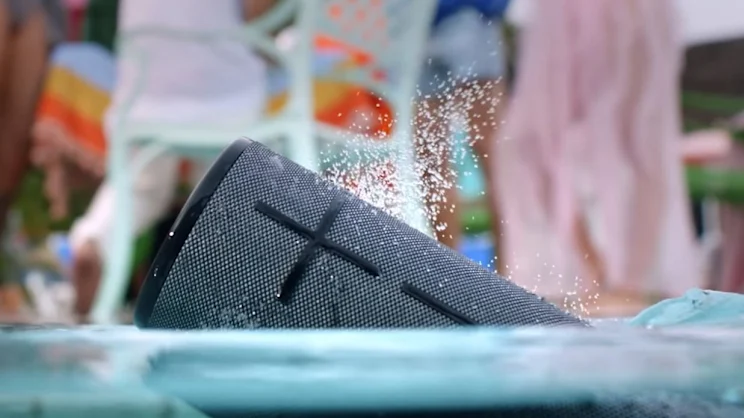
Getting Started With the UE Boom Bluetooth Speaker
The ue boom bluetooth speaker remains a popular choice for people in New Zealand who want portable sound for beach trips, backyard gatherings, camping weekends, and daily music listening. Whether you are upgrading from the ue boom original or using the newer ue boom 3, understanding the speaker’s setup and battery behaviour can make the experience much smoother.
Many users choose the UE Boom range because it is lightweight, waterproof, and easy to carry around. The speaker also delivers strong sound for its compact size, making it suitable for both indoor and outdoor use. Before using the speaker regularly, it helps to learn the basic controls, charging process, and Bluetooth pairing steps.
Understanding UE Boom 3 Buttons and Controls
The ue boom 3 buttons are designed to be simple and easy to access even when outdoors. On the front of the speaker, you will find the large plus and minus buttons used for volume control. At the top, there is a power button and a Bluetooth pairing button.
The Magic Button on the top of the ue boom 3 allows users to play, pause, and skip tracks directly from the speaker without touching a phone. This feature is especially useful during travel or while exercising. Some users moving from the ue boom original notice that the button layout is slightly different, but the overall operation remains straightforward.
Learning the buttons properly can prevent accidental pairing issues and make daily use more convenient.
How to Pair UE Boom 3 Correctly
A common question from new owners is how to pair ue boom 3 with smartphones, tablets, or laptops. The process is usually fast and only takes a minute. First, power on the speaker and hold the Bluetooth button until you hear a connection sound. Then open the Bluetooth settings on your device and select the speaker name from the list.
Following the proper ue boom 3 instructions is important because some pairing problems happen when the speaker is already connected to another nearby device. If the speaker does not appear in the Bluetooth menu, restarting both the speaker and the phone often helps.
For users who frequently switch devices, using the UE app can make pairing management easier and improve connection stability.
Fixing Boom 3 Pairing Not Accepted Problems
One of the most frustrating issues users experience is boom 3 pairing not accepted during setup. This can happen for several reasons, including outdated Bluetooth settings, interference from previously connected devices, or low battery levels.
If boom 3 pairing not accepted appears repeatedly, try removing the speaker from your phone’s saved Bluetooth devices and reconnecting from the beginning. It is also useful to check whether the speaker firmware is updated through the companion app.
In some cases, resetting the speaker solves the issue entirely. Holding the power button and volume down button together for several seconds usually triggers a reset process. After restarting, pairing often works normally again.
How to Tell if UE Boom Is Charging Properly
Many first-time users ask how to tell if ue boom is charging because the charging indicators are not always obvious at first glance. When connected to power, the speaker usually displays a small light indicator near the charging port or power area.
If you are wondering how to tell if ue boom is charging, the easiest method is to leave the speaker plugged in for several minutes and then check whether the battery level increases through the mobile app or voice battery status feature. A steady charging light normally indicates that the charging process is active.
Using a reliable charging cable and adapter is important because damaged accessories can slow charging or prevent the battery from charging fully.
How Long Should a UE Boom Take to Charge?
Another common question is how long should a ue boom take to charge? In most situations, a UE Boom speaker needs around two and a half to three hours for a full charge when using a suitable charger.
The answer to how long should a ue boom take to charge? can vary depending on battery age, charging cable quality, and whether the speaker is being used while charging. Older batteries may require longer charging times and may not hold power as effectively as they did when new.
For best battery performance, avoid leaving the speaker permanently connected to power for extended periods after charging is complete.
How Do I Know if the Speaker Is Fully Charged?
Users also frequently ask, how do i know if the speaker is fully charged? Normally, the charging indicator changes status once the battery reaches full capacity. Some models stop flashing while others display a solid light.
If you still wonder, how do i know if the speaker is fully charged?, you can press the power button briefly to hear a spoken battery update. The UE app can also display an exact battery percentage, which is more accurate than relying only on indicator lights.
A fully charged UE Boom speaker should provide many hours of playback, depending on volume levels and usage conditions.
How to Check Battery Life on UE Boom
Knowing how to check battery life on ue boom is useful before taking the speaker outdoors or travelling. The easiest method is through the UE mobile app, where the battery percentage is shown clearly on the main screen.
Another option for how to check battery life on ue boom is pressing the volume up and volume down buttons together. Many UE Boom models respond with a voice announcement that reports the remaining battery level.
Checking battery life regularly helps avoid unexpected shutdowns during road trips, picnics, or outdoor events.
How to Turn Off Boom 3 Speaker Safely
Some users accidentally leave the speaker running after use and later discover the battery drained completely. Learning how to turn off boom 3 speaker correctly helps extend battery life over time.
To understand how to turn off boom 3 speaker, simply press and hold the power button until the shutdown sound plays and the indicator light turns off. It is best not to leave the speaker powered on unnecessarily, especially during travel or storage.
Turning the speaker off properly also prevents unwanted Bluetooth reconnections with nearby devices.
Final Thoughts on the UE Boom Experience
The ue boom 3 continues to be a strong portable speaker option for people who want durability, portability, and reliable sound quality. Whether you are moving from the ue boom original or buying your first ue boom bluetooth speaker, understanding charging behaviour, pairing methods, and battery management can improve the overall experience.
By learning how to pair ue boom 3, following the correct ue boom 3 instructions, understanding the ue boom 3 buttons, and knowing answers to questions like how to tell if ue boom is charging, users can avoid many common issues. Simple maintenance habits and proper charging routines can also help the speaker perform better for years of regular use.