We are specialists in quality batteries. We have batteries, chargers and accessories for everything you can think of. Low prices, big inventory, expert advice. Find your battery here!
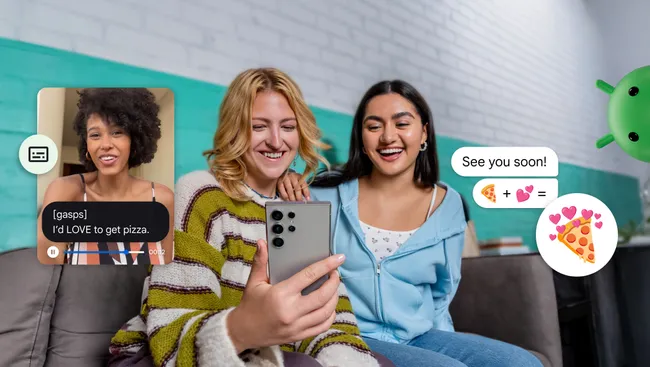
Expressive Captions add feelings and [gasp] emotions to Android’s Live Captions
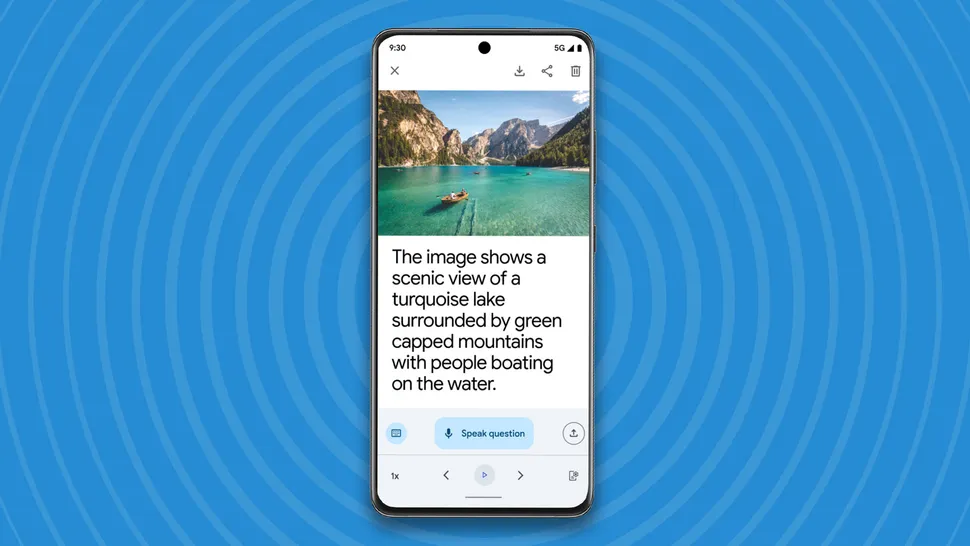
Google Lookout gets new Gemini enhancements
Gemini on Pixel phones will now remember more information about you and your interests
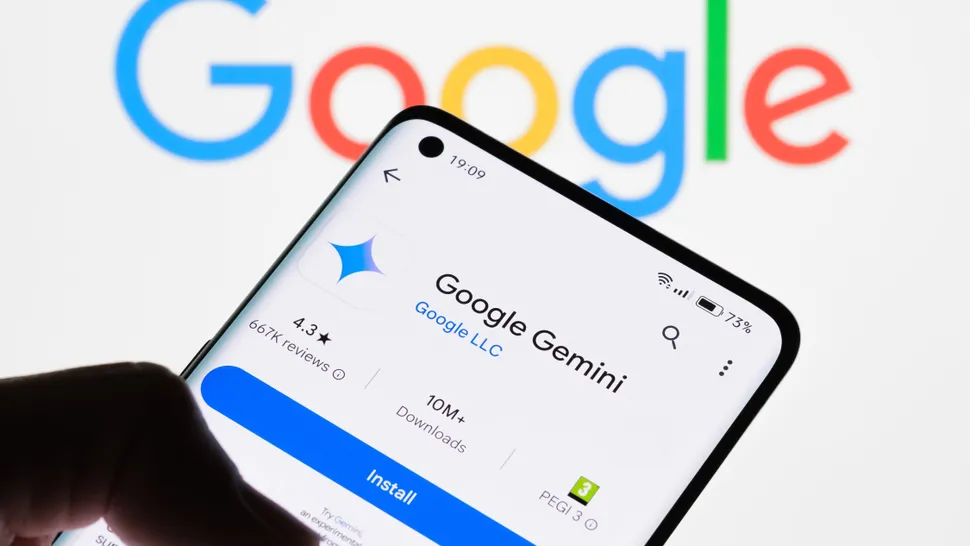
Googlehas released a number of new AI features for most Android phones, plus a couple that work only on its Pixel range of devices.
Some of the new features work inGoogle Gemini, Google’s AI app, but most of them work throughout the whole Androidoperating system, which means there will be some big changes for Android users. Let’s break it down.
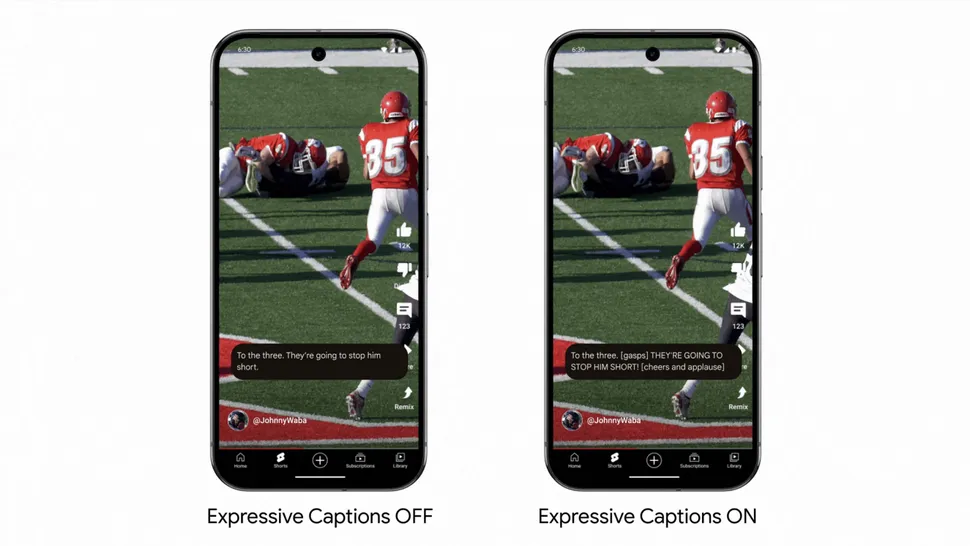
Here’s how the same football game looks with Expressive Captions turned off and on(Image credit: Google)
First up are Expressive Captions, which are a way of bringing more emotions into the rather dull and lifeless world of subtitles and captions. Google introducedLive Captionsto Android back in 2019, so if anything plays audio on your phone, it also has captions. They work much the same way that automatic subtitles do onYouTubevideos – your phone generates them live, based on what it interprets the person is saying.
Live Captions, however, remain rather lifeless. With Expressive Captions, Google is utilizing the power of AI to help you get more of the context of what’s happening. You’ll see comments in square brackets like [whispers] and [cheers and applause] appearing amongst captions, giving you a better understanding of the feelings and emotions being conveyed.
Intense vocalizations will be written in [ALL CAPS], while vocalizations like [sighing], [grunting] and [gasping] will also appear. Ambient background sounds will also be tagged. Because Live Captions are part of the operating system you’ll now get Expressive Captions with most things you watch, so look out for them.
Google Lookoutis an assisted-vision app that’s available on Android devices via thePlay Store. It uses AI to help people with low levels of vision, or sight loss, explore the world around them using their phone’s camera. You can use it for reading out text, scanning food labels, currency identification, and even scanning your surroundings to identify things like doors and windows and find out how far away they are.
Now Gemini AI is part of the Lookout app, which means it has much richer, more helpful descriptions. If you take a photo in the app you’ll now hear its description read aloud in a natural-sounding voice, and you can ask Loopout follow-up questions about it.
New Gemini extensions
The more extensions that Google Gemini has, the more apps it can bring its AI magic to. Now Gemini has a new Spotify extension, which means you can play your favorite songs or discover playlists from within Gemini.
Gemini will now also connect to your phone and messages app, meaning you can call contacts and send messages from within Gemini. Google says that “soon” you’ll be able to use Gemini to control your smart home devices. Finally, Gemini will now also connect to Maps, which means you’ll get more information about places.
More Android features
Pizza-themed sticker combos available in Emoji Kitchen.(Image credit: Google)
Also in the December update you’ll find new pizza-theme sticker combos that you can share with friends using Emoji Kitchen in Gboard, Google’s keyboard app. You can also use QR codes in Quick Share, which makes it easy to share pictures, videos and documents without having to add people as contacts or verify devices. Now you just generate a QR code for people to scan. Documents you scan using your phone will also now be improved, with better contrast and white balance.
Pixel-only features
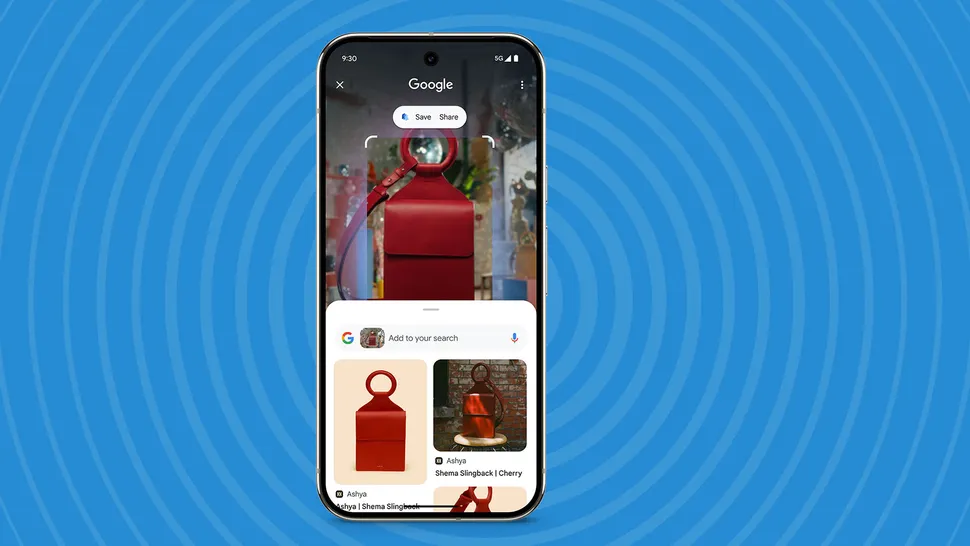
Circle to search on a Pixel phone.(Image credit: Google)
If you’ve got a Google Pixel phone then you get some extra features in the December Android update. There are a lot of small updates to things like the camera and security settings, but the most important feature is Gemini Saved Info. This means you can ask Gemini to remember more about you, what you’re interested in, and what you like, so that it can tailor its responses to more of what you’ll be interested in.
Pixel users will also get some updates to the Pixel-exclusive app, Pixel Screenshots. Pixel Screenshots uses Gemini to analyze and recall the information embedded in your screenshots. Now you can use Pixel Screenshots to save things when you’re using Circle to Search with just one tap.
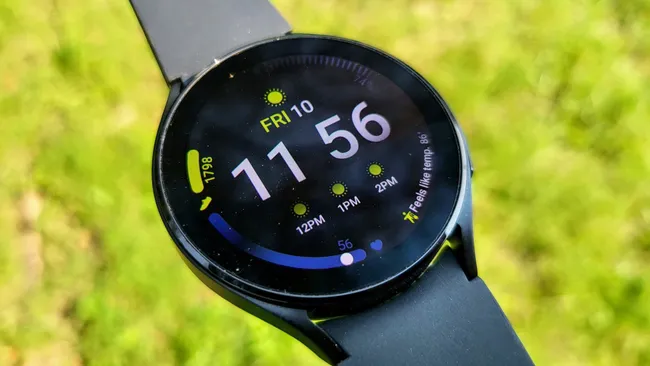
All of Samsung’s Wear OS smartwatch models have now started receiving One UI 6 Watch in at least one region.
What you need to know
The last stage of Samsung’s One UI 6 Watch rollout appears to be underway, with users in Korea seeing the update become available for the Galaxy Watch 4 and Galaxy Watch 4 Classic.
The move comes as Samsung has updated the Galaxy Watch 6 series, Galaxy Watch 5 series, and Galaxy Watch FE to Wear OS 5 in recent days and weeks.
The updates, beginning abroad, will eventually come to the US and North America at a later date.
Samsung is reaching the final stage of itslengthy One UI 6 Watch rollout, which brings Wear OS 5 to all the company’s Wear OS smartwatches. As of today, users in Korea started seeing the One UI 6 Watch update become available for the Galaxy Watch 4 and Galaxy Watch 4 Classic, according to aposton Samsung’s community forums. The update is currently available for only the Bluetooth models of theGalaxy Watch 4 series, and only in Korea — for now.
The company launched One UI 6 Watch alongside theGalaxy Watch Ultraand Galaxy Watch 7, released in July. It made its way to the Galaxy Watch 6 series late last month. Just yesterday, Dec. 3,Samsung brought the Wear OS 5 upgrade to the Galaxy Watch 5 series and the Galaxy Watch FE.
That means all of Samsung’s Wear OS watches, from the oldest Galaxy Watch 4 to the cheapestGalaxy Watch FE, are beginning to get the boost to One UI 6 Watch. As is typically the case, Bluetooth models of the Galaxy Watch will receive the upgrade in a few regions to start. Then, over the coming days and weeks, LTE-equipped models will become eligible to upgrade, and it’ll arrive in more regions. North American units are often towards the end of the line when it comes to receiving One UI 6 Watch upgrades.
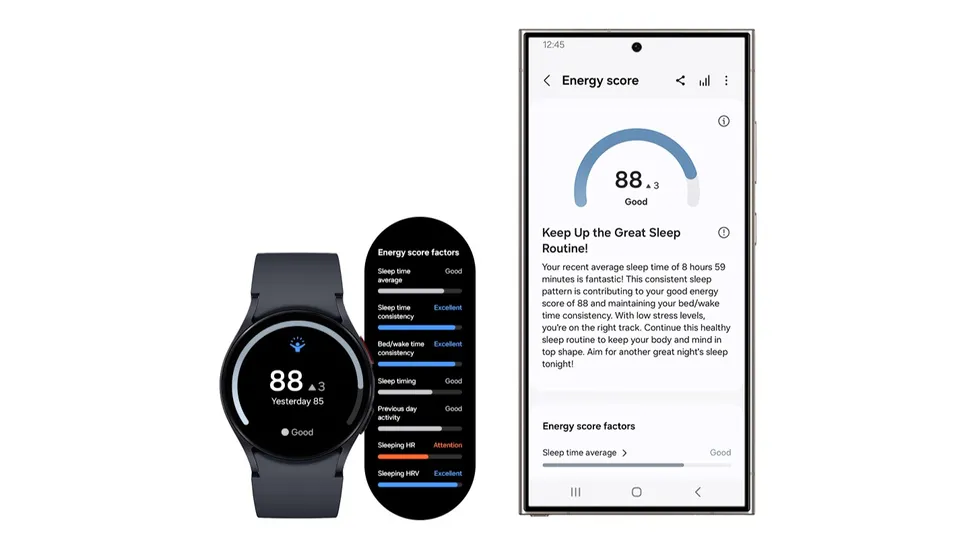
(Image credit: Samsung)
A core part of the One UI 6 Watch update are health-related feature additions. Samsung is banking on the combination of Samsung Health and Galaxy AI, aiming to use it to help wearers improve their fitness and health. Energy Score is like Samsung’s rendition of Garmin’s Body Battery, and Sleep Analysis aims to let you know how well you slept. These features were exclusive to newer Galaxy Watch models at first, but are making their way to older ones now.
Samsung initially promised up to four years of software updates for the Galaxy Watch 4, which isn’t much of a concrete guarantee. However, it appears that old smartwatch may be nearing the end of its software support.Wear OS 5.1looks like a minor update, based onAndroid 15, so the chances of the Galaxy Watch 4 making it to the eventual Wear OS 6 are slim.
Still, the first-generation of any product line typically receives poor software support, but that hasn’t been the case with the Galaxy Watch 4 (which is a first-gen product in the sense that it was Samsung’s first Wear OS watch). It’s had a great run with software upgrades, starting with Wear OS 3 and now supporting Wear OS 5.
A new Pixel Troubleshooting app update brings the temperature check feature to Pixel 6 and above.
What you need to know
Google Pixel Troubleshooting update gets new Device Temperature check feature.
It allows Pixel 6, Pixel 7, Pixel 8, and Pixel 9 users to check their device temperatures whenever their devices seem warm to touch.
The temperature check feature involves relevant color schemes to accurately represent the device’s condition.
Some Pixel phones might have a nifty new feature that lets users identify how hot their devices are running directly from their handsets’ battery settings.
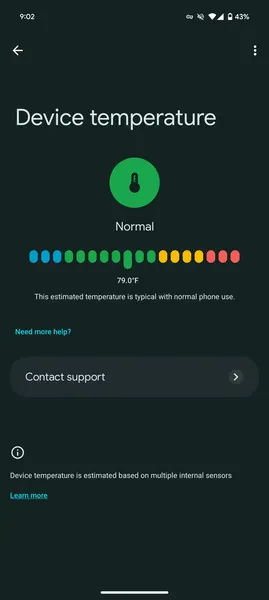
Google has apparently released a Pixel Troubleshooting app update for its devices, ranging from Pixel 6 to the latestPixel 9 series, notes9to5Google. The latest update brings a new “Device temperature” feature, which can be seen in the Battery section of the device Settings.
(Image credit: 9to5Google)
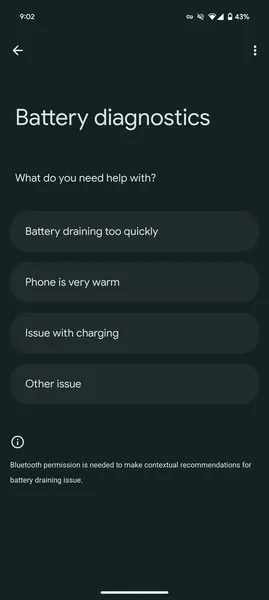
It sits under the battery diagnostics’ “Phone is very warm” section, which earlier showcased settings that keep the device battery optimized. Another way to access the new page is to directly search for “Device temperature” through the Settings app.
Under the Device temperature, users can now find four relevant colors, evidently dubbed Cold, Normal, Warm, and Elevated, indicating the current temperature state of the device.
The new page further indicates that the projected device temperature is according to various internal sensors that the aforementioned Pixel phones already ship with. 9to5 further notes that users can also witness other tips like “To cool down your phone, provide airflow to your phone if possible” and “Use only cases or covers made for your specific phone,” among others.
The live device temperature is being rolled out via the Pixel Troubleshooting app bearing the1.0.693922709version. Pixel phones include the Pixel 6, Pixel 7, Pixel 8, and the Pixel 9 series. It has not yet been rolled out to Pixel Tablet. As 9to5 notes, the update was seen running on the devices mentioned above, running on stableAndroid 15, which wasrecently rolled outto all compatible Pixel phones.
For the uninitiated, the Pixel Troubleshooting app was introduced last year, and the Pixel 8 was one of the first handsets to receive the feature. It helps users diagnose their battery and network issues, and the new temperature feature is indeed a valuable addition as it eliminates the need for installing third-party apps or devices to measure the device’s temperature.
According to a new report, Samsung has no plans to introduce its first-generation tri-fold smartphone next year. Nonetheless, a renowned display analyst has offered an insight into the device’s global availability.
Huawei stole a march on Samsung earlier this year with the Mate XT. (Image source: Huawei)
Samsung has not officially confirmed that it is working on a new type of foldable yet. Nonetheless, rumours have been flying around in recent weeks about the company’s plans to challenge theHuawei Mate XTwith its own version. Now, Ross Young of Display Supply Chain Consultants (DSCC)has offered insightsinto the state of Samsung’s first ‘tri-fold’ smartphone.
In short, it appears that the company’s foray into a new foldable form factor will not be ready in time for its 2025 hardware refresh. For reference, successors to theGalaxy Z Flip6andGalaxy Z Fold6are anticipated, as well as the so-called Galaxy Z Flip6 FE. Incidentally, Young has also disclosed new information about a new Galaxy Z Fold Special Edition too, details of which we have covered separately.
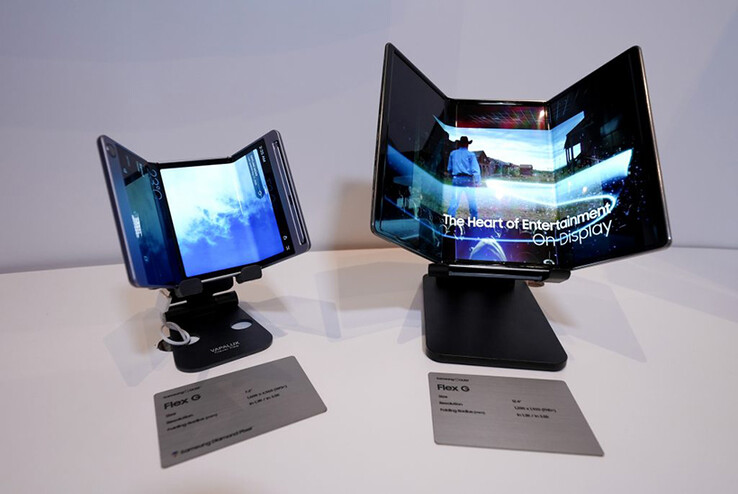
While Samsung’s first-generation tri-fold will not be with us next year, Young expects it to arrive in ‘early 2026’. As it stands, the company is believed to have adopted the form factor that Samsung Display showcased a few years ago with theFlex Grather than theFlex Swraparound alternative that Huawei offers with theMate XT.
Samsung’s first tri-fold may look like the Flex G on the right. (Image source: Samsung Display)
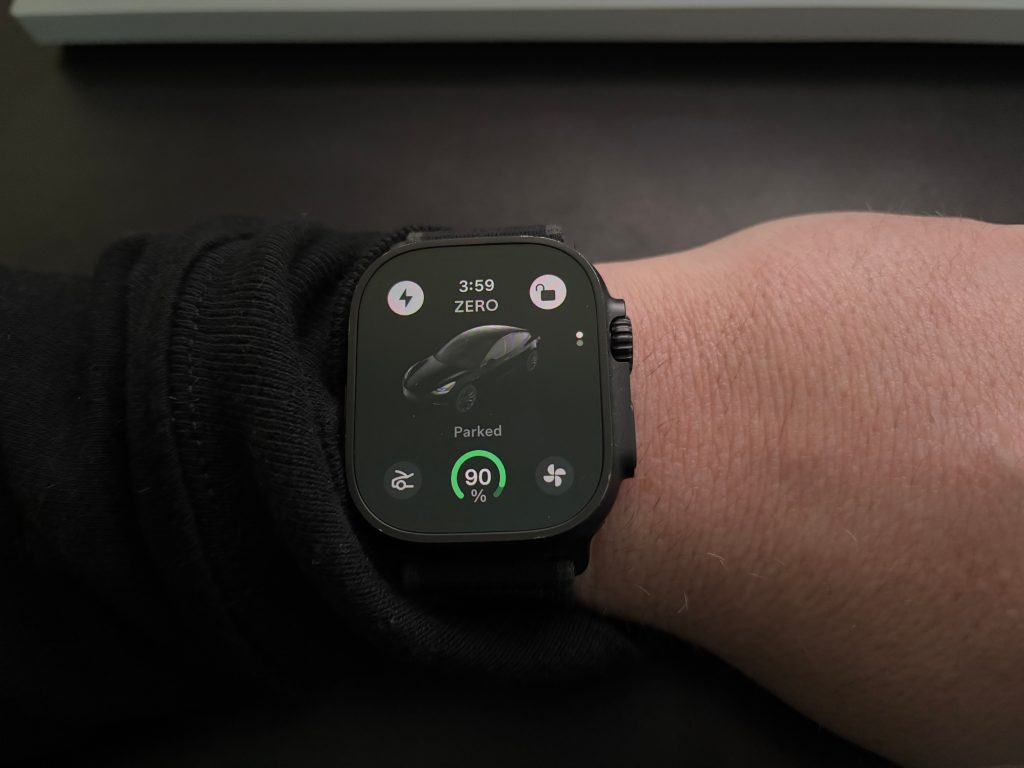
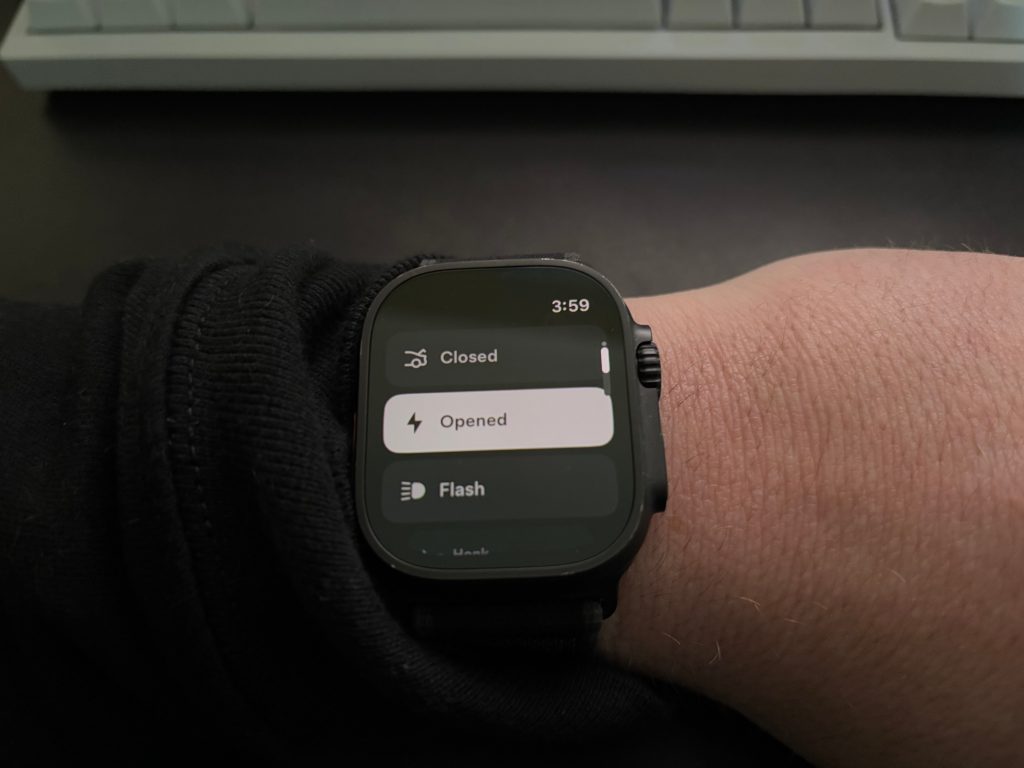
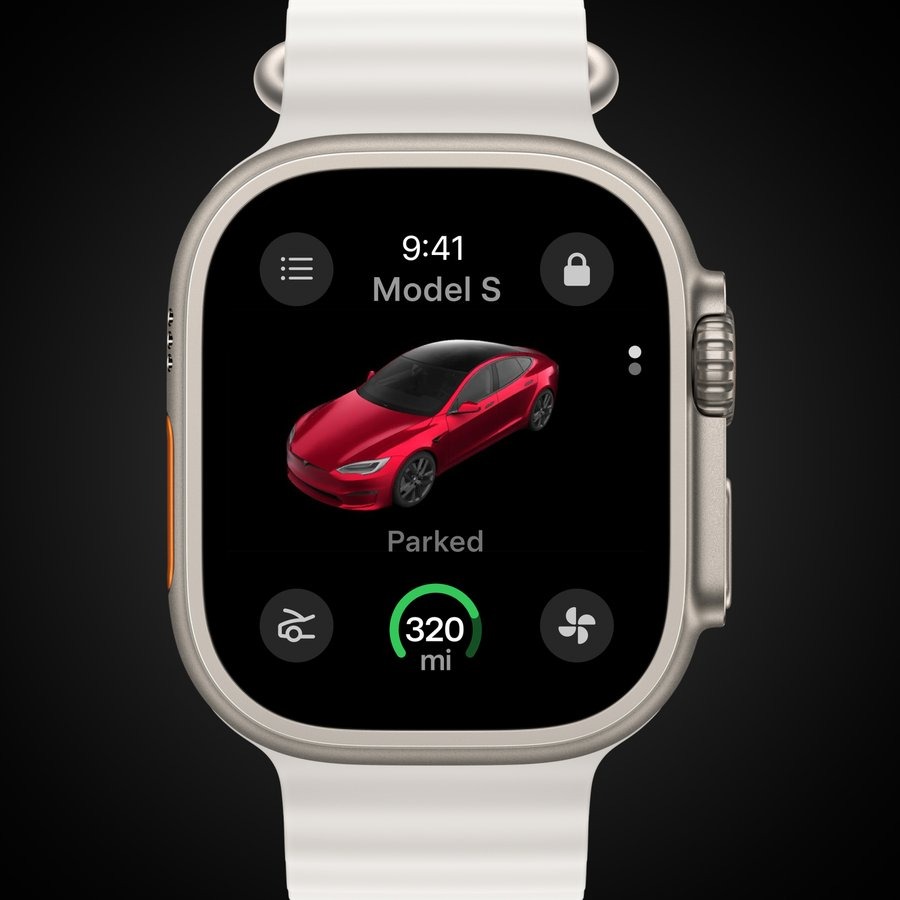
Tesla has launched a new app for Apple Watch with digital key functionality. The app was just announced yesterday, alongside Tesla’s 2024 Holiday Update. Use your Apple Watch as your phone key You can also view battery charge, open frunk & turn on climate control What’s New In This Version: ● Pair your watch as a key and use your favorite Tesla App functions on Apple Watch ● Watch and save Dashcam and Sentry Mode clips at Security > Dashcam Viewer
The Tesla app for iPhone allows users to directly communicate with their vehicles and energy products. Features include: ● Check charging progress in real time and start or stop charging ● Heat or cool your car before driving – even if it’s in a garage ● Lock or unlock from afar ● Locate your vehicle with directions or track its movement ● Send an address from your favorite apps to start navigation in your car ● Allow your passengers to quickly control media ● Flash lights or honk the horn to find your vehicle when parked ● Vent or close the panoramic roof ● Summon your vehicle out of your garage or a tight parking space (for vehicles with Autopilot) ● Update your vehicle software from wherever you are ● Engage with Powerwall: monitor how much energy is stored from solar, used by your home, or exported to the grid ● Download your solar production and battery usage data
Here’s how it looks:
(Image from: 9to5Mac)
Tesla for Apple Watch requires watchOS 11. That means these models are supported:
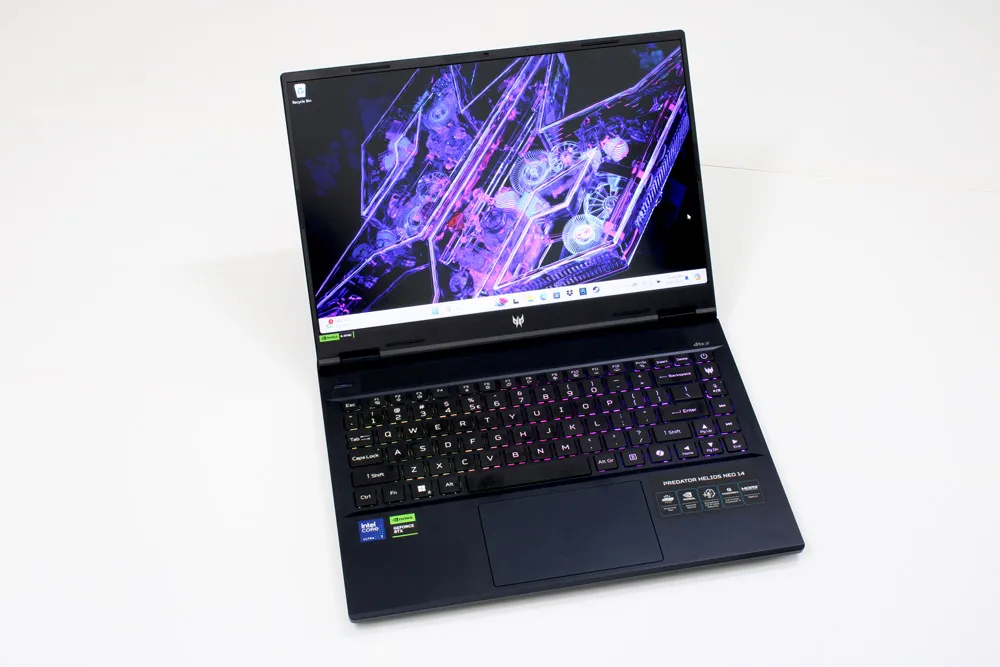
Verdict The Acer Predator Helios Neo 14 offers commendable performance, a color-rich ISP display, a comfortable keyboard for both gaming and typing long essays, and a damn-good battery life for a gaming laptop. It’s not flashy, but who needs flashy when everything else it offers is rock solid?
Pros
+Vivid ISP display
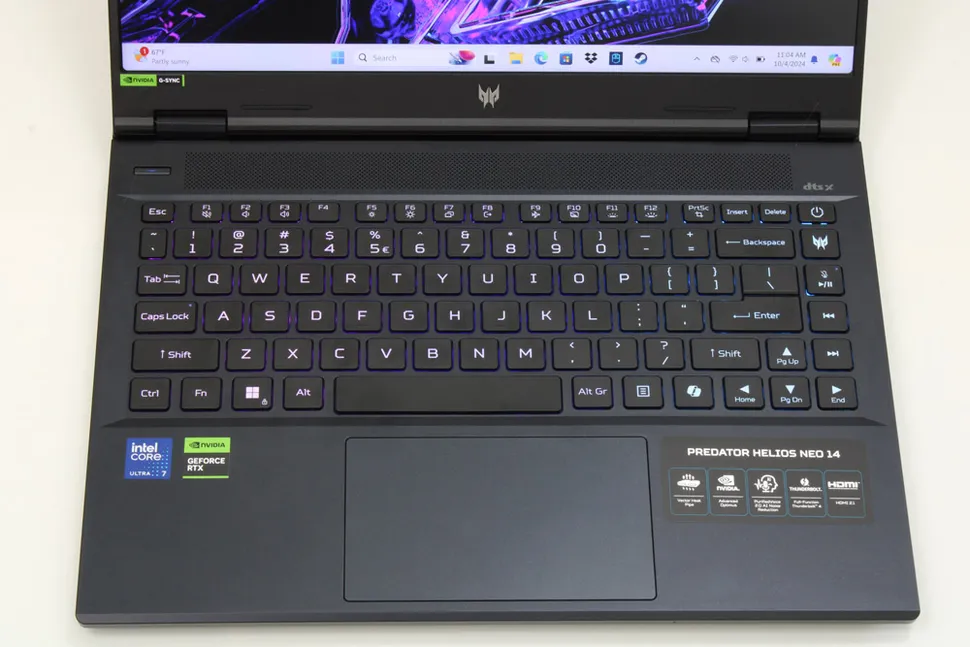
+Comfortable and springy keyboard
+Over eight hours of battery life
+Stays cool
+Good gaming performance
Cons
-Rough trackpad
-Collects many fingerprints
-Bass doesn’t come through the speakers
The Predator Helios Neo 14 is a quiet gem of a gaming laptop and a wonderful addition to the Helios line-up. It doesn’t stand out like flashier 14-inch portable machines, butAcerdidn’t sacrifice any key features for the sake of making it a fine competitor on price alone.
Its processor and graphics card put it within punching distance of gamer favorites like the ROG Zephyrus G14 andRazerBlade 14 and get long battery life for a modern gaming laptop. The places where Acer did skimp on taking this laptop to the next level are easy to forgive.
If you like 14-inch gaming laptops as much as I do, don’t overlook this one.
Acer Predator Helios Neo 14 (2024): Price and configurations
(Image credit: Future)
The configuration I reviewed has the best-balanced price-to-performance ratio compared to its cheaper or more expensive alternatives. For $1,799, this Acer Predator Helios Neo 14 pairs a mid-range CPU and GPU with 16GB of memory but doesn’t leave out a high refresh rate display and Nvidia G-Sync. For the price, those are standard features these days, but it’s still nice to see Acer include them in a 14-inch gaming laptop.
It’s not exactly a steal over the RTX 4060 version, though, which costs $1,474 (originally $1,499). Other than the GPU, both variations have the same features. That goes for the $1,744 (originally $1,799) configuration, too. It has the same GPU but a fasterIntelCore Ultra 9 185H.
Acer traded fancier features like a 4K OLED display and a slimmer chassis (which is a good thing — more on that in a bit) to make the Helios Neo 14 as cheap as possible, which makes it a more compelling choice against the competition. A newAsus ROG Zephyrus G14with anAMDRyzen 9 8945 HS, an RTX 4070, and a nicer display still costs $2,000 or more. (A similarly configuredRazer Blade 14costs hundreds of dollars more.) However, there are 14-inchHP Omen Transcendsout there with the same GPU, an OLED display, and a Core Ultra 9 for the same price (when on sale) as the most expensive Helios Neo 14.
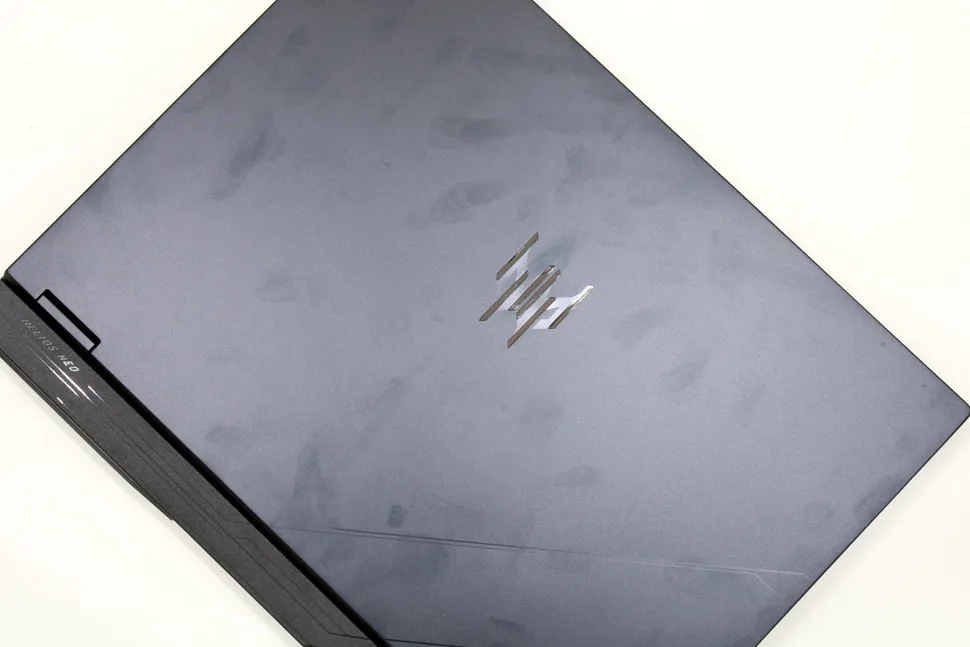
Acer has continually refined the look of its Predator line-up for the last few generations, and the Predator Helios Neo 14 is, so far, my favorite. Its all-black chassis is sleek and refined. The engraved Predator logo on the lid is subtle, only more noticeable when light catches on its metallic surface. Size-wise, it’s about a pound heavier than something as small and slim as the ROG Zephyrus G14, but it’s bearable to carry around.
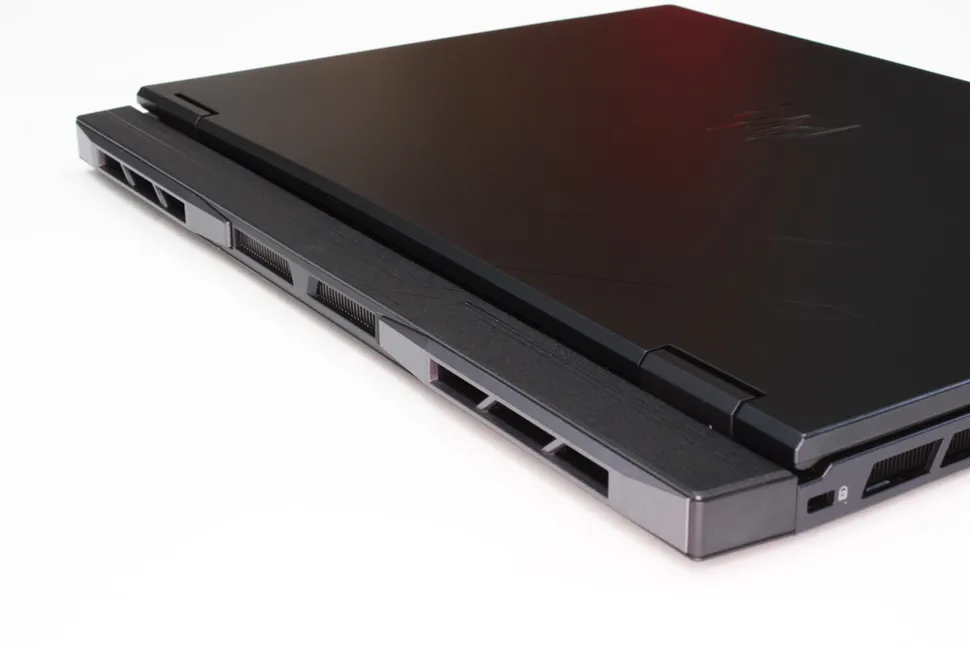
The display does not connect directly to the back of the laptop, though. The bottom chassis extends about another inch, giving this gaming laptop a “butt.” It’s for thermal management, so I don’t mind how it looks. Exhaust ports line the backside, which helps keep this 14-inch laptop cool so it can run games as fast as possible. (Excuse me while I giggle like a child about butts and exhaust ports.) I also like how it expels heat away from my body; gaming on a laptop that blows hot air directly onto my mouse hand is not comfortable at all!
One thing the Helios Neo 14 needs is a special finish to reduce the appearance of fingerprints, something likeApple’s anodization process orAsus’ Ceraluminum. This might drive up its price, but globs of oil smudges really take away from its overall appearance. I found myself cleaning the laptop’s surfaces after every time I used it; they bothered methatmuch.
Acer Predator Helios Neo 14 (2024): Ports
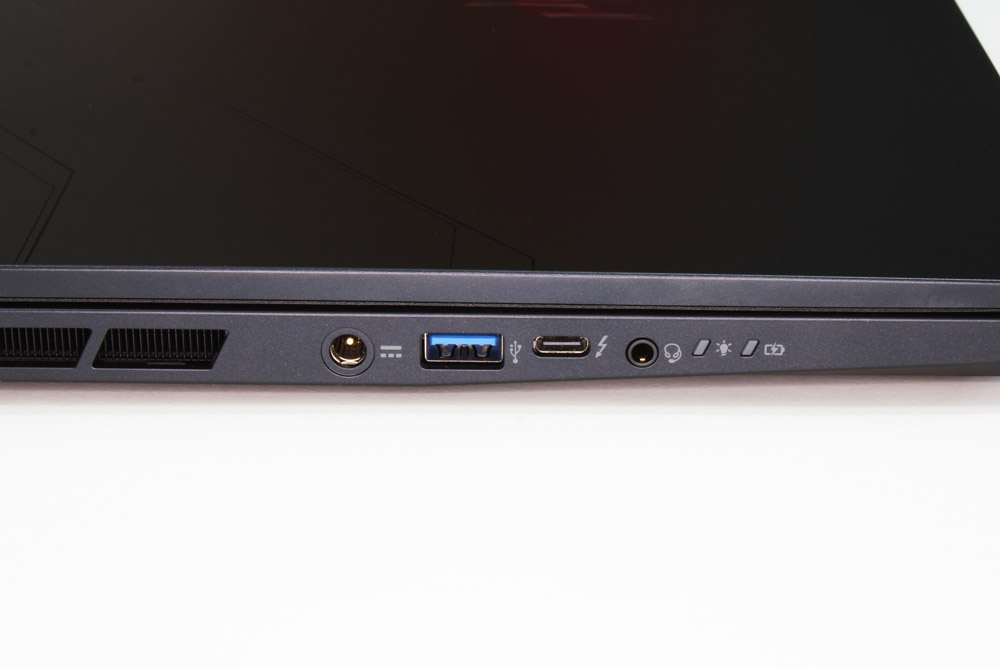
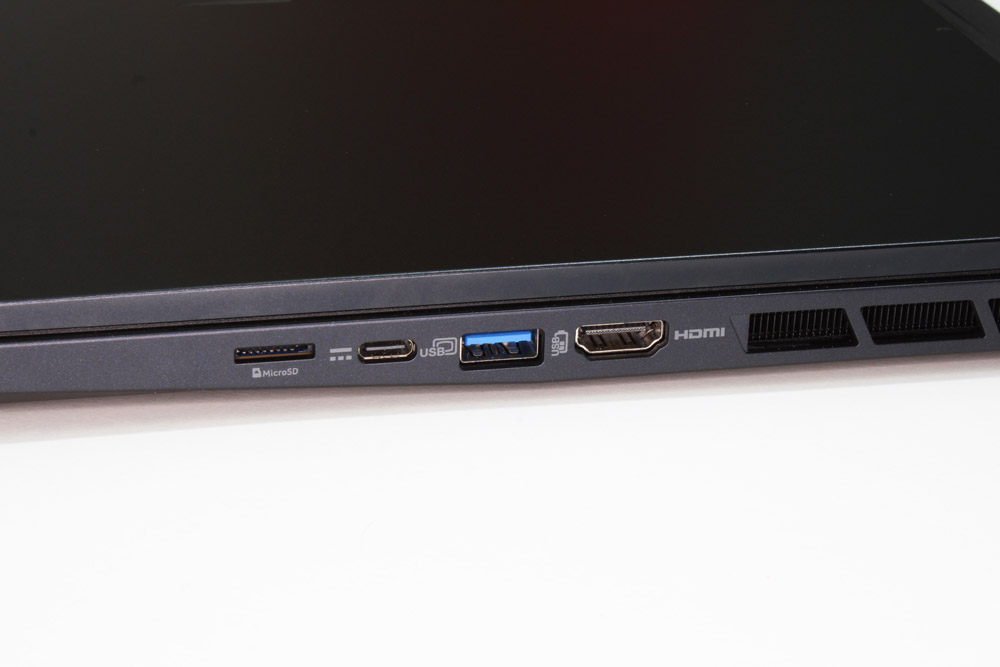
Acer stuck about every type of port you could think of into the Helios Neo 14: two USB-A, two USB-C ports, a headphone/mic combo jack, a microSD slot, and an HDMI 2.1 port. One USB-C port supports Thunderbolt 4 with passthrough charging, though the battery does not charge as fast with that method compared to its proprietary charger with a barrel-style connector.
Acer Predator Helios Neo 14 (2024): Display
(Image credit: Future)
One advantage of an IPS display over an OLED for gaming is its lack of a reflective surface — and you don’t need to crank up the brightness just to be able to see the game properly. Aside from cost, it’s a big reason I’ve stuck with IPS displays and monitors. Not all IPS displays handle colors the same way, though, so I was delighted to see how vibrant and sharp everything looked on the Predator Helios Neo 14.
Our tests showed its display covers 110% of the sRGB color gamut, which is more than the gaming monitor I use, theGigabyteM28U (and Ilovemy monitor). Anything I threw on the screen, from games to YouTube videos, looked and felt the same, just on a smaller screen. The Helios Neo 14’s display also has a higher brightness compared to my beloved monitor; 358 peak nits compared to 300, making it better to game in the dark without roasting my eyeballs.
Acer Predator Helios Neo 14 (2024): Keyboard and touchpad
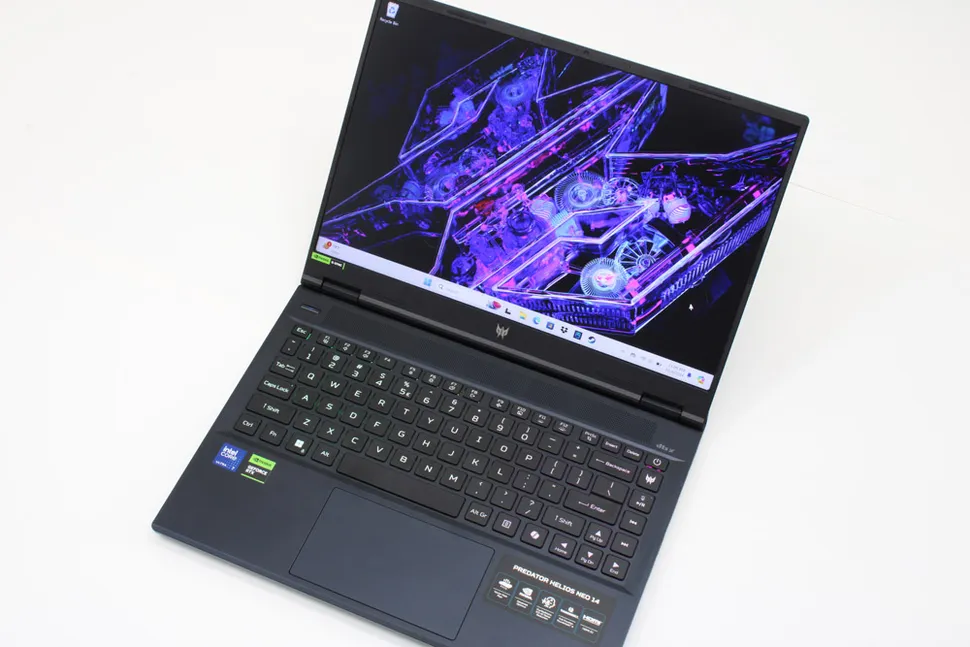
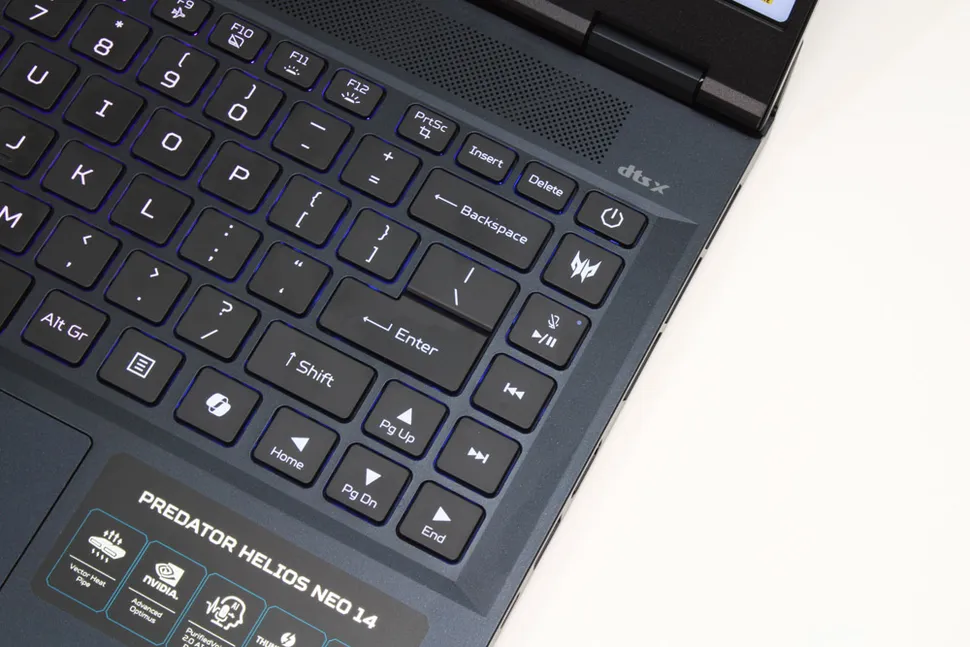
I usually have trouble typing as fast and as accurately when I start using a new keyboard. (My hands are tiny!) But I can legitimately say the Helios Neo 14’s keyboard made me a better typist even though its keys are smaller and spaced out further than what I’m used to.
UsingMonkeytype’s typing test, I was able to reach 91 words per minute (WPM) with 97 percent accuracy. I can only do as much as 81 WPM with 90 percent accuracy with the keyboard I use every day.
The Helios Neo 14’s keys also have a shorter actuation point than what I’m used to, but every press still felt full and satisfying. While not mechanical, they have the spring of a mechanicalswitch, so typing barely requires pressure. It was pleasant!
But, oh, the trackpad — I avoided using it altogether, even if I was only using the laptop to check my email. While it was responsive and didn’t miss any of my inputs, my fingers did not glide over the surface at all. Every movement sent quick, unpleasant vibrations through my fingertips.
Acer Predator Helios Neo 14 (2024): Audio
If you listen to metal or industrial music like I do — anything with a fast, heavy bass — this laptop’s speakers will take the hard edge out of your favorite songs. Even equalizing the sound with the laptop’s included DTS:X software didn’t make mefeellike I was in a goth club dancing toRob Zombie’s “Dragula”or one of my favorite Combichrist songs.
It sounded like I had the volume cranked in my old 2001 Saturn’s stock speakers: the instruments were flat, lifeless, and slightly tinny. They were definitely lower quality compared to the speakers of other gaming laptops, like the Asus ROG Zephyrus G14 and theRazer Blade 14.
Podcasts and dialogue? The Helios Neo 14 shines here. Voices are crisp, and you won’t even need to turn the volume all the way up to understand whoever is talking. As a person with hearing loss, I appreciated this immensely.
Acer Predator Helios Neo 14 (2024): Gaming and graphics
Compared to other, similarly configured 14-inch gaming laptops we’ve previously tested like the ROG Zephyrus G14 (RTX 4060) and Blade 14 (RTX 4070), the Helios Neo 14’s gaming performance falls in the middle. At 1080p and high or ultra graphical settings, it averaged about five to 15 frames per second (fps) higher than the Zephyrus G14, and about 10 to 15 fps lower than the Blade 14.
Some specific, notable differences: the Helios Neo 14 achieved 76 fps inFar Cry 6, with the Zephyrus G14 coming in at 69 fps and the Blade 14 at 85 fps; inBorderlands 3, the Neo 14 averaged 82 fps, with the Zephyrus G14 at 67 fps and the Blade 14 at 98 fps; and it managed 87 fps inGrand Theft Auto V,close to the G14’s 84 fps but much lower than the Blade 14’s 100 fps. It was also much closer to the G14 in Assassin’s Creed Mirage (83 to 78 fps, respectively) but further away from the Blade 14, which achieved 107 fps.
InRed Dead Redemption 2on medium graphics settings at 1080p, the Neo 14 also barely passed the Zephyrus, 58 fps to 53 fps, respectively. The Blade shot ahead to 73 fps.
Acer Predator Helios Neo 14 (2024): Performance
With the release of Intel’s new Core Ultra processors, the Helios Neo 14’s processor is technically last-gen. It’s still no slouch, although it didn’t score as high as its competitors in synthetic benchmarks.
In GeekBench 6 single-core and multi-core tests, it scored 2425 and 13091, respectively, falling behind the AMD Ryzen-configured Zephyrus G14 (2614) and Blade 14 (2684) by about 7-10 percent. In 3DMark TimeSpy, it scored 10263, falling behind the Blade (12602) by roughly 20 percent. But the Neo 14 scored 7 percent higher than the Zephyrus (9535), which makes sense since the model we tested had an RTX 4060 GPU instead of an RTX 4070 like the Neo.
Synthetic tests are great for quick comparisons, but real-world benchmarks can often tell a better and more realistic story. In transcoding a 4K video to 1080p, the Helios Neo 14 took three minutes and 55 seconds with HandBrake — 30 seconds faster than the Zephyrus G14. It also transferred 25GB of data faster (1784 MBps) than the G14 (1289 MBps) and slightly faster thanHP’s Transcend 14 (1730 MBps).
Acer Predator Helios Neo 14 (2024): AI performance and features
This laptop’s RTX 4070 graphics card does all the heavy lifting regardingAI, scoring 13072 in GeekBench’s ML 0.6 test. The Intel processor, on its own, only achieves a score of 3989.
However, that’s still faster than the Qualcomm Snapdragon chip we tested in the Dell Inspiron 14 Plus. However, as we noted before, GeekBench’s ML test may not be optimized for Snapdragon processors; the Intel Core Ultra 7 155H’s NPU provides about 11 TOPS of computational power, while the Snapdragon X Plus X1P-64-100 has up to 45 TOPS.
The Helios Neo 14 lacks AI features, though. Microsoft has specific requirements as to what defines a Copilot+ PC, and the Helios Neo 14 doesn’t have a powerful enough NPU to meet those requirements.Only new AMD Ryzen AI and Intel Core Ultra 200Vseries laptops can access Windows AI features.
Finally, for some more real-world gaming experience, we tested all of the laptops on Sid Mieier’s Civilization VI: Gathering Storm graphics benchmark at Medium graphics settings and 1080p resolution.
The Zenbook S 14 averaged 48fps, which is solidly in the middle of the pack for gaming performance compared to the other premium laptops. The Zenbook S 16 had the best gaming performance, averaging 63fps, while the MacBook Pro 14 (51fps) came in second. Both the Zenbook 14 OLED Q425 (31fps) and XPS 13 (22fps) performed worse than the Zenbook S 14.
Acer Predator Helios Neo 14 (2024): Battery life
A gaming laptop that can last more than a few hours on battery power, even just streaming video or music, is still hard to come by these days. The best productivity laptops can reach double digits, so gaming laptops don’t usually suffice for everyday tasks. But the Helios Neo 14 lasted eight hours and 42 minutes in our battery run-down test, which is fantastic for a gaming laptop.
That’s a half-hour longer than our results with the ROG Zephyrus G14 and 15 minutes longer than the Blade 14.
Acer Predator Helios Neo 14 (2024): Webcam
I have a habit of assuming that all laptop webcams are awful, but I would not be afraid to use the Helios Neo 14’s webcam on an important work call.
In a well-lit room, the webcam’s automatic exposure adjustments didn’t make me appear washed out. Even against a white background, the light didn’t bounce back too brightly.
When my cats decided to explore the laptop, all their cute little whiskers appeared clearly defined. It even made the faded blue streaks in my hair more noticeable without adjusting the color saturation.
Acer Predator Helios Neo 14 (2024): Heat
Fourteen-inch gaming laptops usually get hot since their chassis are so compact. There’s less room for heat to dissipate, so it gets trapped inside and could make certain parts of the laptop uncomfortable to touch.
Even parts of the keyboard. This laptop intakes air from its underside, so while I don’t recommend gaming with it in your laptop for this reason, I was surprised that I could play less graphically intensive games with it in my lap. Even in performance mode. (Not on my bare skin, of course.)
The hottest part of the Helios Neo 14 is the top center of the keyboard deck (above the vent), reaching up to 121.5 degrees Fahrenheit while gaming — makes sense since it expels hot air out of its backside. But the WASD and spacebar keys, places that I have felt get uncomfortably warm on the ROG Zephyrus G14 and Razer Blade 14, stayed cooler than my normal body temperature.
Acer Predator Helios Neo 14 (2024): Software and warranty
Like most Acer laptops, the Helios Neo 14 comes with a standard one-year warranty but also abunch of software that you may or may not want: Planet 9, Dropbox, ExpressVPN, McAfee, Acer LiveArt, two separate DTS sound applications, and Intel Unison (another take on Windows Phone Link). You can easily uninstall those, though it will take a little bit of time.
Acer Predator Helios Neo 14 (2024): The bottom line
The Acer Predator Helios Neo 14 isn’t a love-at-first-sight laptop. But after getting to know it, I could see myself being happy using it every day for gaming and working.
I’m not thrilled with its trackpad, but its keyboard is one of the most comfortable I’ve ever used for typing short emails or long pages of text. It’s much cheaper than flashier gaming laptops, cranks out high frame rates even in demanding games, stays cool, and the battery lasts over eight hours. It’s everything you’d expect from a gaming laptop, plus a little extra.
Users on old iPhones have been sent a new alert in WhatsApp
It says that WhatsApp will stop working unless they update iOS
WhatsApp will end support for software older than iOS 15.1 in May 2025
Thebest iPhonesare known to last a long time, so it’s no surprise if you’re still happily rocking an older iPhone that’s several versions out of date. Despite that, you might find it’s not compatible withWhatsAppfor much longer, as the developer of the popular messaging app has warned users that they’ll soon need to upgrade their iPhone or stop using the service.
As detailed byWABetaInfo,WhatsApphas begun sending notifications warning users that they need to “update to the latest version of iOS to continue using WhatsApp.” These alerts are being sent out to users who are running anything older than iOS 15.1 on their iPhones.
If that sounds like you, you’ve got around five months until WhatsApp stops working on your iPhone, as the app notification says WhatsApp will end support for older versions of iOS on May 5, 2025. WhatsApp recommends you open the Settings app and go to General > Software Update to update your iPhone.
Yet it might not be so simple to do that. If you have an iPhone 5s, iPhone 6, or iPhone 6 Plus – or any earlier iPhone – your device will not be compatible with iOS 18. That means you won’t be able to update your iPhone, and consequently WhatsApp will stop working on your device next May.
That’s not all.WhatsApp doesn’t have an iPad app yet (beyond a beta app that’s only available to people using Apple’s TestFlight service). That means that next year’s WhatsApp update will also end support for the first-generation iPad Air, the iPad mini 2, and the iPad mini 3, as they too only support iOS versions earlier than iOS 15.1
Time to upgrade?
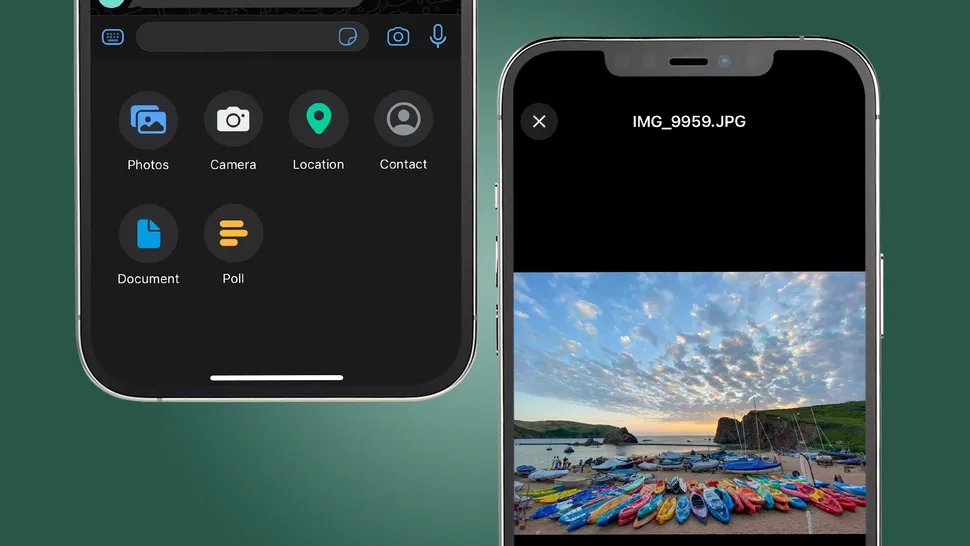
WhatsApp has been steadily introducing new features to its iOS and Android apps over the past year, including the ability to send photos in ‘original quality’ (above).(Image credit: Future)
WABetaInfo states that WhatsApp could be ending support for older iPhones so that it can make use of newer features and technologies introduced in iOS 15. WhatsApp can go ahead and add these features if it doesn’t have to worry about being held back by outdated iPhones that can’t run them.
As well as that, it’s likely that there aren’t too many WhatsApp users currently on versions of iOS predating iOS 15.1, considering the iPhones in question were released years ago. WhatsApp could redirect its efforts to optimizing the app further for the larger number of users who have more modern iPhones.
The Redmi Note 14 Pro Plus is one of an increasing number of smartphones that are IP69 certified against dust and water. Unfortunately, it seems this will only be true in China. By contrast, Xiaomi has now confirmed that the device will miss out on IP69 certification globally.
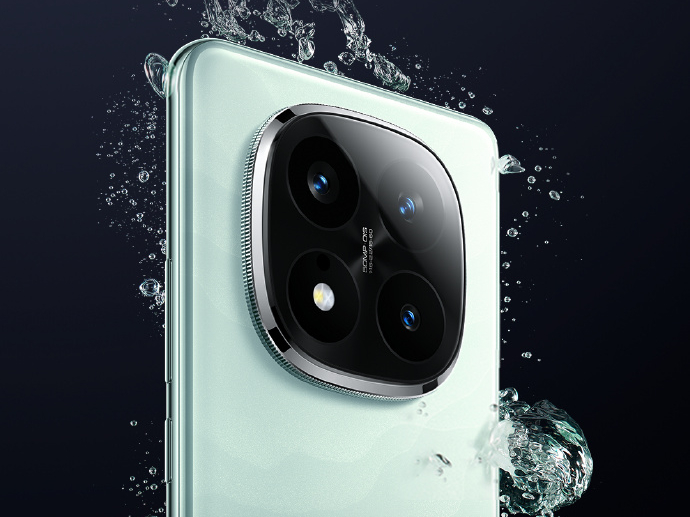
The Redmi Note 14 Pro Plus will miss out on IP69 certification globally. (Image source: Xiaomi)
The Redmi Note 14 Pro Plus is not available outside China just yet. Nonetheless, Xiaomi is preparing to introduce the device in China on December 9 alongside at least theRedmi Note 14 Pro 5G. In the meantime, the company has decided to run a teaser campaign on its Indian social media channels, mirroring an equivalent it ran for theRedmi Note 13 Pro Plusat the start of the year.
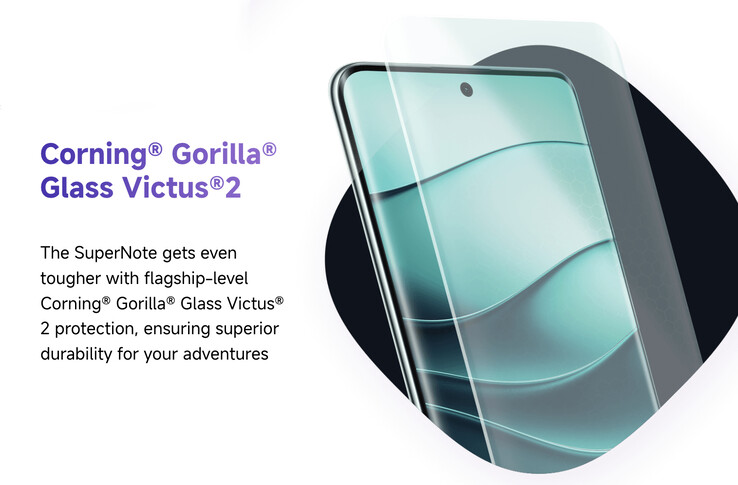
For example, Xiaomi boasts that the Redmi Note 14 Pro Plus is its ‘most advanced SuperNote’ to date. To that end, it has now effectively confirmed that rumoured camera downgrades between Chinese and global models were unfounded. Moreover, it reports that the Redmi Note 14 Pro Plus is the only model in its segment to feature Corning Gorilla Glass Victus 2, which protects its large AMOLED display.
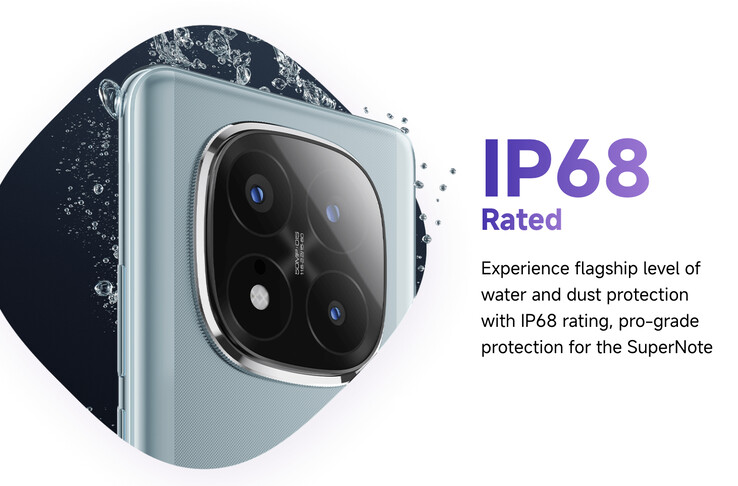
While most manufacturers reserve Gorilla Glass Victus 2 for their flagships, the Redmi Note 14 Pro Plus will receive a durability downgrade for its international release. Specifically, Xiaomi has decided against certifying the device to IP69, as it does in China.
Instead, the Redmi Note 14 Pro Plus will reach India with IP68 certification. For reference, the second digit means that the device has been tested to withstand hot and high-pressure water jets. As a result, it seems that the international version of the Redmi Note 14 Pro Plus will not be as waterproof as its Chinese counterpart.
(Image source: Xiaomi)
Source(s)
Xiaomi
Whether you want to take better photos or find a faster way to launch a Google search, these tips will help.
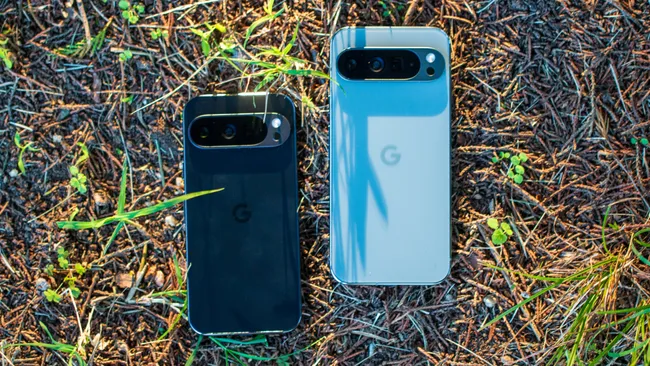
The Google Pixel 9 Pro.
Google’s Pixel phones usually known for their camera quality and design, especially the higher-end Pro models and the foldable Pixel 9 Pro Fold. But don’t sleep on the software; it’s often an important part of what distinguishes them from other Android phones.
That’s truer than ever now that Google is emphasizing new AI features in its latest Pixel devices, especially with the recently announcedPixel 9,Pixel 9 ProandPixel 9 Pro XL.
Google typically updates Pixel phones every few months, meaning new features arrive fairly regularly. Google sells eight different Pixel models: the $499Pixel 7A, $499Pixel 8A, $699Pixel 8, $999Pixel 8 Pro, $799Pixel 9, $999Pixel 9 Pro, $1,099Pixel 9 Pro XL and $1,799Pixel 9 Pro Fold.
You may not need Google’s newest Pixels to use these features; several of them work on older devices, although others only run on phones with the company’s latest Tensor chip. Keep in mind that some of these features might require a software update or an update to Google’s apps and services.
Google also updates its Pixel devices with new features over time, so there’s a chance we’ll see more additions arrive in the coming months. Whether you’re interested in touching up old photos or having Google screen your calls, these tips will help you get the most out of your device.
Look for anything in your screenshots
How many times have you taken a screenshot of something so that you can save it for easy reference later, only to go digging through your photos to find it? Google is trying to solve that problem with the new Screenshots app on thePixel 9 family,which not only houses your screenshots but lets you search for anything within them. If you took a screenshot of a Wi-Fi password or order confirmation number, you can look it up by opening the screenshots app and typing in the search bar.
Take a group photo with everyone in it
Google has novel, and perhaps somewhat awkward, solution to the problem of getting everyone (including the person taking the photo) in a group picture. A new feature called Add Me, which launched on thePixel 9 lineup,combines two photos to create an image with everyone in the frame. Just open the camera app, tap the option forAdd Me and follow the on-screen prompts. The process will involve taking a photo and handing the phone to another person in the group to take a second picture.
Search for anything by drawing a circle around it
As the name implies, your can launch a Google search just by drawing around almost any object on the screen through Google’s Circle to Search feature. See some appetizing sushi in your Instagram feed? Just circle it to find sushi restaurants nearby. It works on thePixel 6 and later.
To use Circle to Search, touch and hold the home button or navigation bar at the bottom of the screen. Then, draw a circle around the object you’d like to search for. Results should appear in a panel on screen almost instantly.
Look up an unknown caller
With its June 2024 Pixel update, Google introduced a new feature that makes it possible to look up a phone number right from the recent calls menu. Just tap the phone number in your call log, and there should be a new option calledLookup. This feature is available on thePixel 6 and later.
Take your temperature with the Pixel 8 or 9 Pro
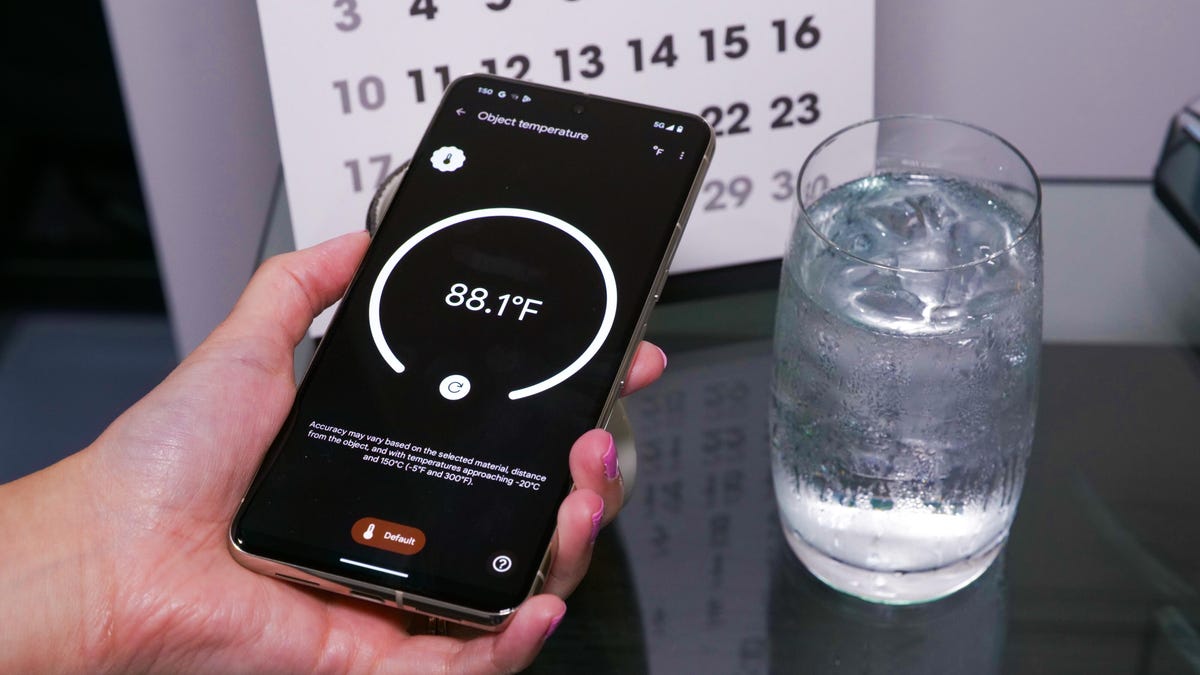
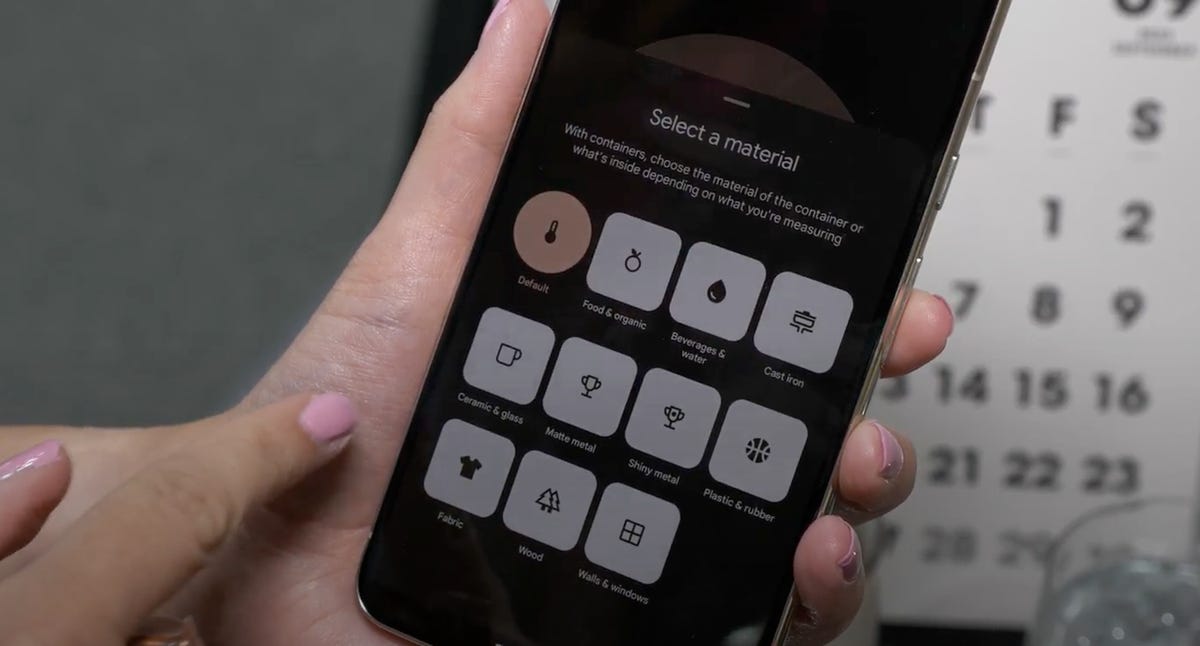
The Pixel 8 Pro, 9 Pro and 9 Pro XLcome with a temperature sensor. Not only can you measure certain objects like a mug of coffee or tea, but you can use it as a contactless thermometer to take your body temperature. Just open theThermometer appand follow the on-screen instructions to get started. Unlike a traditional contactless thermometer, using the Pixel’s temperature sensor involves moving the phone across your forehead toward your temple so that it can measure your temporal artery.
(The Pixel 8 Pro has a temperature sensor that can measure how hot or cold beverages and other materials are. )
(To use the Pixel 8 Pro’s Thermometer app, you have to tell the phone which material you’re measuring.)
Change someone’s expression in a photo
The Pixel 8 and later come with a feature called Best Take, which makes it possible to alter a person’s expression in a photo. This feature only works when snapping several versions of the same photo in a row. If you happen to close your eyes in the best photo, for example, you’ll be able to swap your face out with another version from a different photo in the bunch. To use it, open a compatible photo in theGoogle Photosapp, tap theEditbutton and selectTools. From there, you should see an option calledBest Take.
Take better close-up photos with the macro focus
If you have aPixel 7 Pro and Pixel 8 and later,you can capture close-up photos in macro mode. Unlike most camera features, you don’t have to enable a specific setting or switch to a certain mode to get it to work. If you have one of the phones mentioned above, just open theCameraapp and hold your phone close to the subject you’d like to photograph. You should see ayellow flower iconappear when macro mode is on. Tapping that flower icon will turn macro mode off.
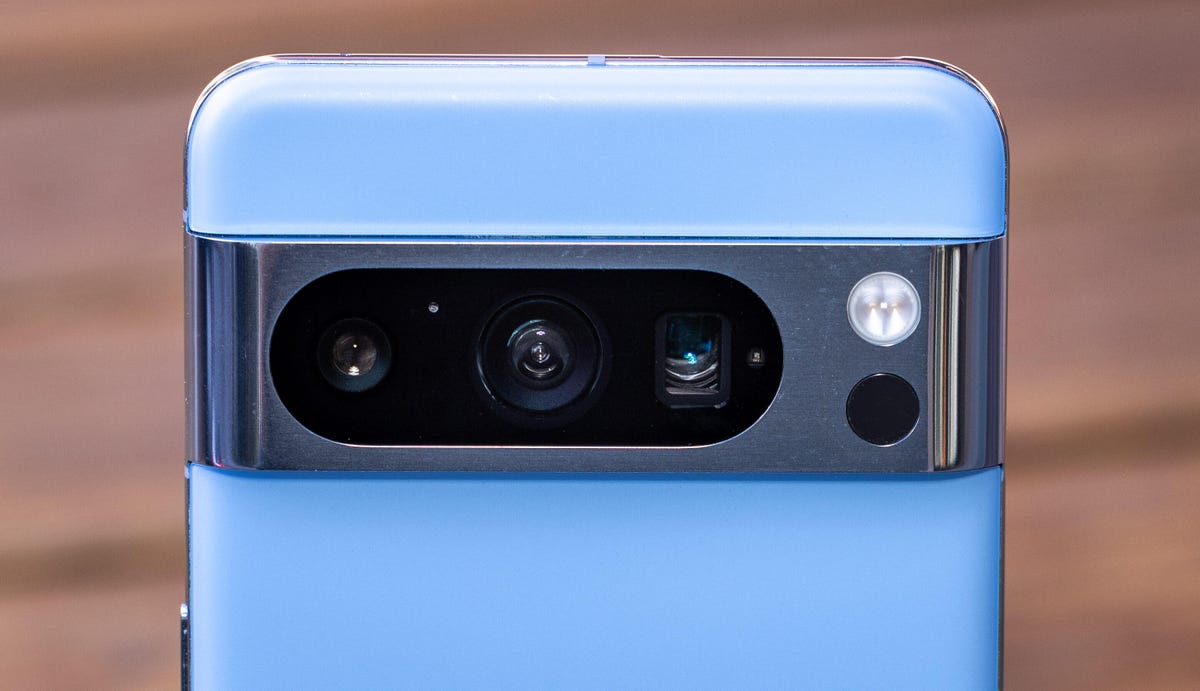
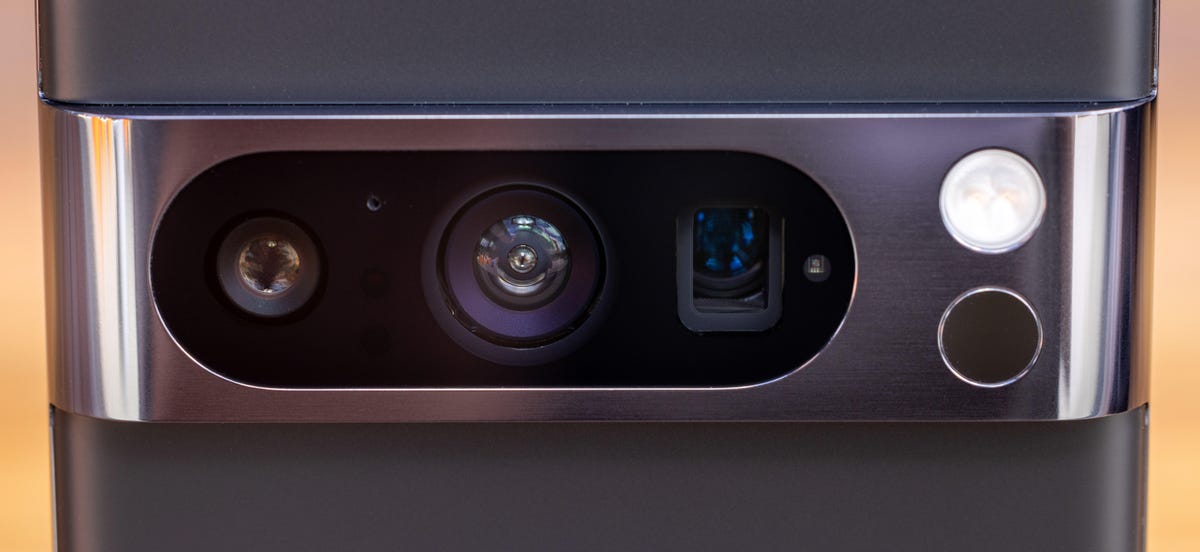
The Google Pixel 8 Pro’s camera bar houses in its oval “pill”: a 48-megapixel ultrawide angle camera (left) with an f1.95 lens, the main 50-megapixel wide-angle camera with an f1.68 lens (center) and the 48-megapixel telephoto camera with an f2.8 lens (right).
Photos and videos are a top priority and a competitive strong suit for for Google’s phones. This closeup of the “obsidian” colored Google Pixel 8 Pro shows its larger new 48-megapixel ultrawide camera at left, its updated 50-megapixel main camera in the center and 48-megapixel 5x telephoto camera at right.
Move or resize objects in a photo
Another photo editing trick that launched last year with thePixel 8 and 8 Prois Magic Editor. As the name implies, this tool lets you resize or move individual objects, people and pets in a photo. Just open theGoogle Photosapp, choose the photo you’d like to edit and press theEditbutton to get started.
From there, tap thecolorful photo iconin the left corner to launch Magic Editor. Once you’re in this mode, tap and hold on to a person or object in a photo to select it. Then, you can pinch-to-zoom to resize it or drag it to another area of the photo. Hit the arrow on the bottom right corner of the screen when you’re finished and wait for your edits to be processed.
Google has since expanded the feature to those with a Premium Google One plan, meaning you no longerneeda Pixel device to access this tool. Those who don’t subscribe or have a Pixel device can get10 Magic Editor saves per monthin the Google Photos app on iOS and Android.
Turn a photo into a cinematic wallpaper
If you have aPixel 6 or newer, you can turn any photo from your library into a cinematic wallpaper. Google applies a 3D effect to the image that emphasizes the subject in the foreground. In my experience, this feature works best on photos clearly focused on one or two people.
To try it out, open your Pixel phone’ssettings menuand tap theWallpaper & styleoption. PressChange wallpaper,choose theMy photosoption and tap the image you’d like to set as your new wallpaper. Tap the icon that looks like three stars and then toggle the switch next toCreate cinematic wallpapersetting.
Add captions to videos with Live Caption
Did you know that your Pixel phone can automatically caption videos, podcasts, phone calls and more? Press thevolume buttonand tap theLive Captionicon, which looks like a tiny box of text, to enable this feature.
Live Captionworks in English on thePixel 2 and higher, so it should be available on any Pixel phone that’s launched in the last several years. The captions are stored and processed locally and never leave your device, according to Google.
You can also tweak certain settings, such as hiding profanity and adding labels to sounds like laughter and applause. Open the Settings and choose Live Caption to customize these options. It’s also important to note that Live Caption can drain additional battery, so you might want to only turn it on when you need it.
Snap a photo just by raising your hand
You don’t always need to press the shutter button to take a photo. You can simply raise your palm to the camera to start a photo countdown timer for 3 or 10 seconds if you have aPixel 6 or newer. This can be particularly useful for group photos.
Just open the Google camera app and tap the settings button near the top of the screen to get started. From there, choose to have the timer set to 3 or 10 seconds. Now the timer should automatically start whenever the camera recognizes your palm.
Sharpen old pictures in your photo library
If you’re anything like me, you have thousands of photos from the last decade stored on your phone or in a cloud service. Those photos likely don’t look nearly as sharp and crisp as the ones taken by today’s smartphones.
As the name implies, Photo Unlur sharpens photos that are out of focus to make the subject look clearer. To use it, just open theGoogle Photos appon your compatible Pixel phone, choose the photo you want to edit, tap theEditbutton and selectTools. Then, tapUnblur.
The feature launched on the Pixel 7 series but is now available inthe Google Photos app on other devices, too.
Take better photos of the stars
Google’s Pixel phones come with a feature that’s specifically designed to help yousnap photos of the night sky. It works on thePixel 3 and higher, but you’ll need to adjust your zoom settings to at least 1x if you’re using the Pixel 4A 5G and later.
Google says the feature works best when taking photos away from city lights at least 45 to 90 minutes after sunset. You’ll also need a tripod or some other steady surface rather than your hands to get the best results.
Just openthe camera app, prop up your phone, make sure it’s steady andtap Night Sightto get started. After a few seconds, you should see a message that says “Astrophotography on.” Press thecapture buttonandleave your phone aloneuntil it’s finished taking the photo.
Translate screenshots in a different language
You can translate screenshots with text written in languages such as Spanish, German, French, Chinese, Japanese, Korean, Italian and more withGoogle’s Lensfeature. Open theGoogle Photosapp and select the screenshot you would like to translate. Then tap theLensicon, which looks like a camera, and choose theTranslateoption. Google’ssupport pagesays this feature should work on Android devices in general, not just Pixels.
Switch to the selfie camera without pressing any buttons
You don’t have to tap any buttons to switch between the Pixel’s selfiecameraand the main camera. Simply open the Pixel’s camera app and twist your phone twice to flip between the cameras. If you’re not sure what I mean by “twist,” Google hasa helpful animationto show you.
If you’re still having trouble, check your Pixel’s settings to make sure this feature is enabled. Open thesettingsapp, chooseSystemand selectFlip camera for selfie.
Have Google wait on hold for you
No one likes waiting on hold. If you have aPixel 3 or later, you can have Google wait on hold and notify you when a representative becomes available. To have Google wait on hold, you’ll have to do two things: Activate the feature, and then turn on Hold for Me during the phone call.
For the first step, open the Pixel Phone appandtap the three dotsin the top right corner. Then, tapSettings, andHold for Me.Tap the switch next to Hold for Me to make sure this feature is turned on.
Just be aware that Hold for Me may not work in every situation, and you can’t play music or other audio while it’s active. You’ll also want to make sure your phone isn’t in silent or vibrate mode. When you’re on a call and have been placed on hold, tap theHold for Mebutton and pressStart.
See how long you might have to wait on hold
Google can also estimate the amount of time you might have to wait on hold when dialing businesses in the US. It’s available on thePixel 3A and laterand works in English. Just open the Phone app, dial the number and you’ll be presented with an estimate of how long you may be placed on hold. The estimate may vary depending on the time of day.
Have Google show automated phone menus on screen
There are times when you might not want to listen to every single option in an automated menu when calling a business. If you have aPixel 3A or later, you’ll be able to see these menu options on screen so that you don’t have to remember them all. The Pixel 7 and 7 Pro can also show certain menu options before they’re spoken on the phone call, Google says. I tested this by calling CVS and Allstate, and sure enough, Google was able to transcribe the spoken menu options in real time.
Open apps or take screenshots by tapping your phone
Add a handy shortcut to your Pixel phone withGoogle’s Quick Tapfeature. This allows you to open an app, take a screenshot, play or pause media, or show notifications just by tapping twice on the back of your phone. It only works on more recent Google phones like thePixel 4A 5G and later.
To turn on Quick Tap and customize its actions, open thesettings menuand chooseSystem. Then, selectGesturesandQuick Tap. From here, turnQuick Tapon and select which action you’d like to perform when tapping the back of your device.
Have Google screen your calls
Sick of robocalls? Google can hopefully help with itsCall Screen feature, which works onall Pixel phones. When this feature is turned on, Google Assistant can answer an unknown call and ask who’s calling and why. It will automatically hang up if it’s a spam call, but you can see how the caller responded and decide to answer if it’s a real caller.
Google doesn’t screen calls from phone numbers that are saved in your contacts, and your Pixel won’t automatically screen calls when you’re using headphones or are connected to Bluetooth. To set up automatic call screening, open thephone appand tap thethree dotsin the top right corner. SelectSettingsand chooseSpam and Call Screen.
Make sure the switch next toSee caller and spam IDis toggled on, and then pressCall Screen. From here, you can choose how Google screens incoming calls. For example, you can set it to screen spam calls, possibly faked numbers, first-time callers, and private or hidden callers. Just tap one of these categories and choose theAutomatically screen. Decline Robocalls option.
‘Tis the season for official presents to Tesla owners as, after issuing FSD V13, Tesla is now bringing its big 2024 Holiday Update with a smorgasbord of long awaited features and some pleasant surprises.
The Tesla app is finally available for the Apple Watch (Image source: Tesla)
Tesla is pushing out its 2024 Holiday Update, and there isn’t something for everyone there this time around.
Older Model Y, or Model S/X owners who don’t own Apple gear, may feel particularly snubbed, as they will be able to take advantage of only a few of the big updates such as the light show feature. Provided that they have matrix headlights, that is.
Those Tesla drivers who don an Apple Watch, however, will be particularly surprised to hear that Watch support for the Tesla app is finally here. They can now use theApple Watchas a phone key to unlock the car, turn the A/C on or off from afar, open the frunk, and get battery charge info, all on their smart timepiece that runs Apple’s watchOS. Yes, Android watches needn’t apply for now, as Tesla is doing app support only for the most popular and ubiquitous smartwatch for now.
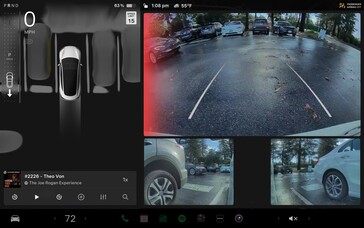
There are other significant Tesla app updates that allow to watch Sentry Mode and Dashcam footage on the phone, or store it to share and edit. Further along the new camera features is the ability to get visible and audible cross traffic warning when reversing and an object is detected right behind the car.
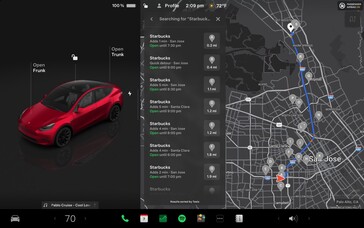
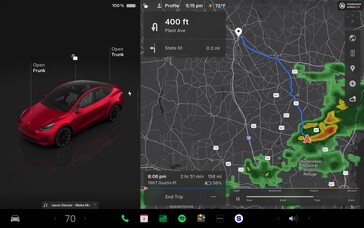
Tesla’s map and navigation options also got a big update, with search filters that display the respective options along the path and the detour estimates. There is a weather overlay, too, that shows precipitation along your navigated route and weather changes at your destination right on the map.
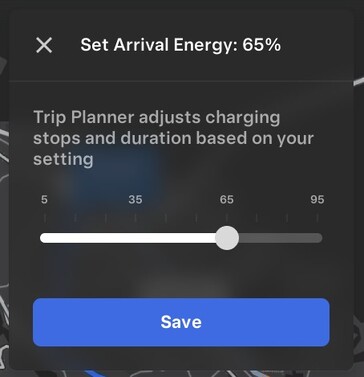
A big new 2024 Tesla Holiday Update feature, and one that has been on people’s wishlist for a while, is the ability to set a desired state of charge at the arrival to your destination. If one wants their Tesla to have at least 60% charge when they get to their target spot, they can now key in the request, and the car will plan Supercharger stops so it makes sure to get you there with more than half of the battery capacity left.
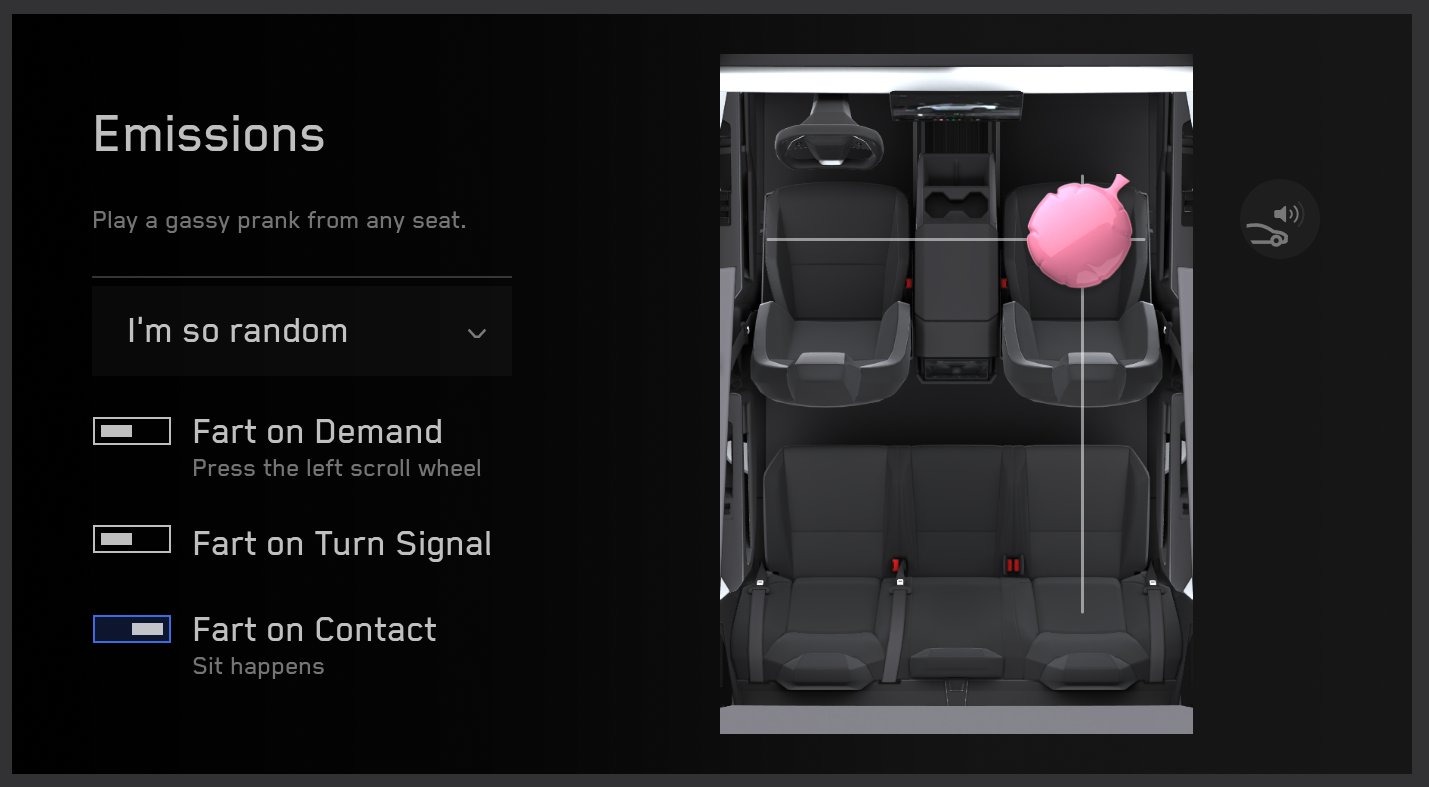
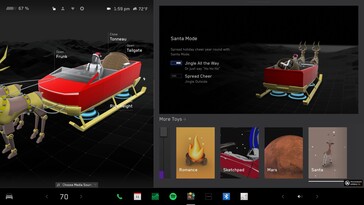
There is some silliness there, of course, such as the Fart on Contact seat prank, or turning the Cybertuck display into a Santa sleigh, just as usual, but a lot of it is very useful and most owners should be satisfied with Tesla’s Christmas-y update this year..
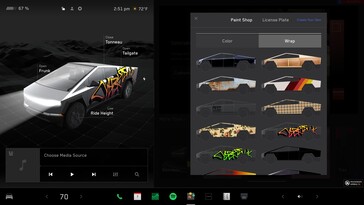
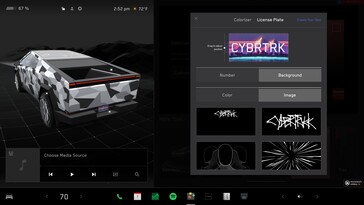
As can be seen, there are plenty of goodies for the newer cars, such as the Model 3 which got autoshifting between Drive or Reverse, or the Cybertruck that can be customized with tailored wraps or license plates now. The 2024 Tesla Holiday Update is coming as an OTA push, starting next week, and should arrive to your vehicle just in time for those holiday jingles.


![Tesla Apple Watch App With Digital Key Functionality Now Available [Download]](https://www.iclarified.com/images/news/95714/457704/457704-640.jpg)
![Tesla Apple Watch App With Digital Key Functionality Now Available [Download]](https://www.iclarified.com/images/news/95714/457691/457691.jpg)
![Tesla Apple Watch App With Digital Key Functionality Now Available [Download]](https://www.iclarified.com/images/news/95714/457694/457694.jpg)
![Tesla Apple Watch App With Digital Key Functionality Now Available [Download]](https://www.iclarified.com/images/news/95714/457697/457697.jpg)
![Tesla Apple Watch App With Digital Key Functionality Now Available [Download]](https://www.iclarified.com/images/news/95714/457700/457700.jpg)
![Tesla Apple Watch App With Digital Key Functionality Now Available [Download]](https://www.iclarified.com/images/news/95714/457703/457703.jpg)